
Get to know Cadenya
We’re developers who love to build. We set out to create a yes-code platform that makes building agents feel like the best parts of building software.
Building an Agentic Loop in Temporal
Walkthrough
$ whoami
> Robert Ross
$ pwd
> Cambridge, MA
Cadenya uses Temporal under the hood to power our users’ agents in our hosted runtime. This guide walks through how we run a Temporal AI agent: the workflows and activities behind it, and how they add up to an agentic loop. We’ll talk about parking an agent loop for a human-in-the-loop approval, queued messages, and triggering a compaction. Cadenya is written in Go, so all of the snippets in this post are close (but not exact) copies straight from our codebase. Strap in!
The Database Behind Our Temporal AI Agents
Cadenya stores agents, variations, and objectives in Postgres. A lot of our Temporal workflows and activities are a dance between database state and the loop. Much of Temporal’s “state” for workflows is mirrored to the database, with additional states like interrupting added. Our database ERD is below to show the (vast) relationships between tables.
erDiagram
  agents ||--o{ objectives : ""
  agent_variations ||--o{ objectives : ""
  objectives ||--o{ objective_context_windows : ""
  objectives |o--o| objective_context_windows : ""
  objectives ||--o{ objective_events : ""
  objectives ||--o{ objective_iterations : ""
  objectives ||--o{ objective_tool_calls : ""
  objectives ||--o{ objective_tools : ""
  objectives ||--o{ objective_queued_actions : ""
  objectives ||--o{ objective_secrets : ""
  objectives ||--o{ objective_feedbacks : ""
  objectives ||--o{ objective_webhook_deliveries : ""
  objective_context_windows ||--o{ objective_events : ""
  objective_context_windows ||--o{ objective_iterations : ""
  objective_context_windows ||--o{ objective_tool_calls : ""
  objective_context_windows ||--o{ objective_context_window_tools : ""
  objective_tools ||--o{ objective_context_window_tools : ""
  objective_events |o--o{ objective_tool_calls : ""
  objective_events |o--o{ objective_queued_actions : ""
  objective_events ||--o{ objective_webhook_deliveries : ""
The diagram could not be loaded. Its source is shown above.
The Agentic Loop as a Temporal Workflow
An agentic loop needs an entry point. Cadenya’s top-level Temporal workflow is called AgentObjectiveWorkflow and accepts a single argument, an AgentObjectiveWorkflowInput protocol buffer that wraps the Objective. For more on the API design, read this blog post.
Our AgentObjectiveWorkflow is responsible for:
- Loading tools that are configured for the Agent that is being given an objective (e.g. refund a customer, book a trip, etc.)
- Executing an activity to call the inference provider with the system prompt and first user message
- Executing child workflows for tool calls
- Popping queued actions out from the database (compaction, messages)
- Starting a child workflow to compact a conversation and continue
The workflow’s function signature takes a single input that is a protocol buffer. The message is defined like:
message AgentObjectiveWorkflowInput {
  // objective is the objective being executed.
  cadenya.api.v1.Objective objective = 1;

  // context_window is the initial context window for this execution.
  cadenya.api.v1.ObjectiveContextWindow context_window = 2;

  // max_iterations caps the total number of LLM iterations. 0 means unlimited.
  int32 max_iterations = 3;

  // total_iterations tracks iterations completed across all executions.
  // Incremented during the loop and forwarded on continue-as-new.
  int32 total_iterations = 4;

  // total_context_windows tracks context windows used across executions.
  int32 total_context_windows = 5;

  // total_tool_calls tracks tool calls dispatched across all executions of
  // this workflow, forwarded on continue-as-new. Compared against the
  // variation's constraints.max_tool_calls to enforce the limit.
  int32 total_tool_calls = 8;
}
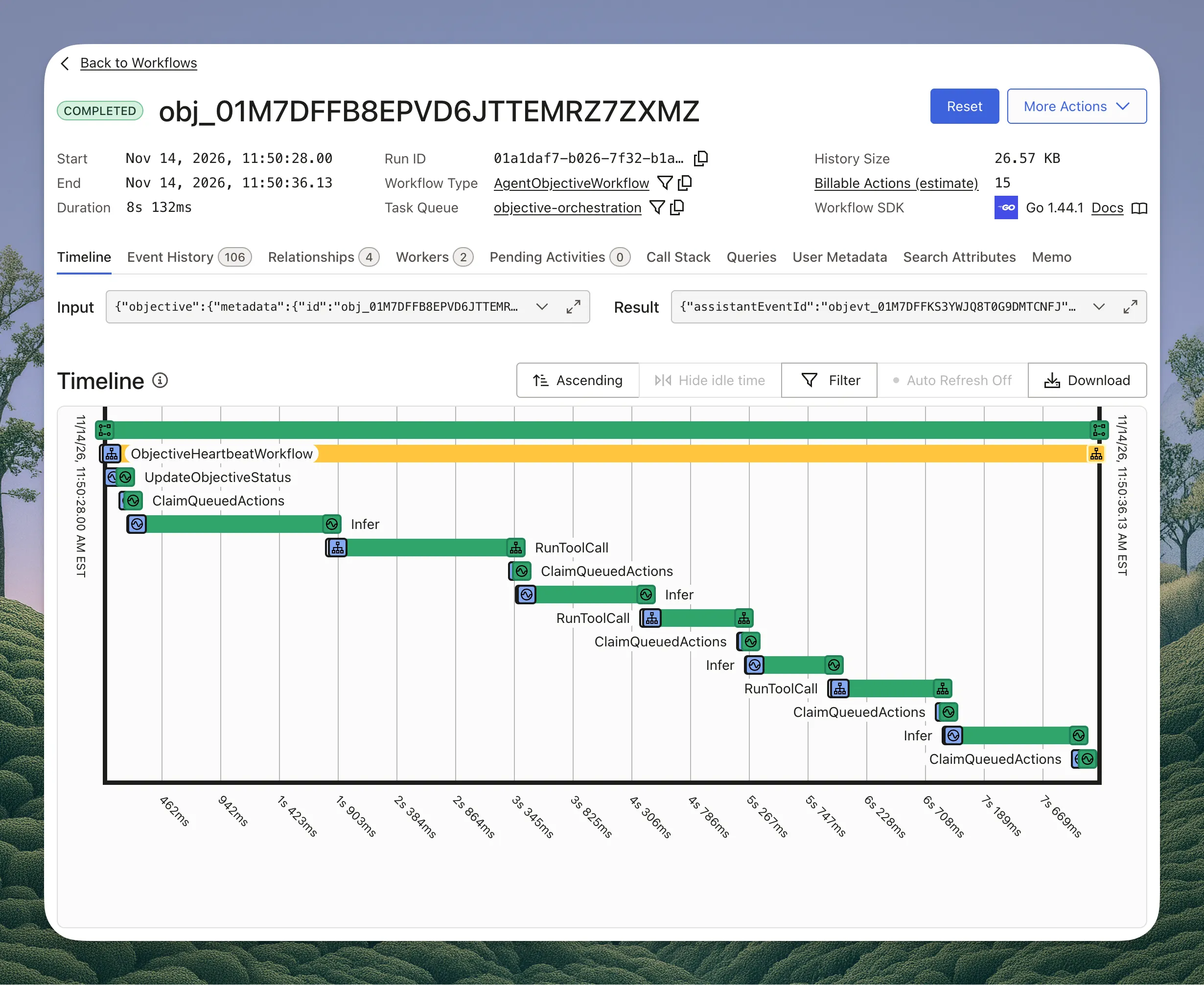
In the Temporal UI, a single run of the workflow looks like this:
Heartbeats
We send heartbeats from a Temporal workflow called ObjectiveHeartbeatWorkflow that is immediately started as a child workflow when the AgentObjectiveWorkflow starts and then “backgrounded” so that the rest of the workflow can continue. Its job is very simple: send heartbeats to any attached SSE handler. It’s the simplest of our workflows:
// internal/objectiveworker/heartbeat_workflow.go
const heartbeatInterval = 5 * time.Second
const heartbeatPulsesPerRun = 100

func ObjectiveHeartbeatWorkflow(ctx workflow.Context, input *objectiveworkflowsv1.ObjectiveHeartbeatWorkflowInput) (*objectiveworkflowsv1.ObjectiveHeartbeatWorkflowOutput, error) {
	actx := workflow.WithActivityOptions(ctx, workflow.ActivityOptions{
		ScheduleToCloseTimeout: 5 * time.Second,
		RetryPolicy:            &temporal.RetryPolicy{MaximumAttempts: 1},
	})

	for range heartbeatPulsesPerRun {
		if err := workflow.Sleep(ctx, heartbeatInterval); err != nil {
			return nil, err
		}

		pulse := (&objectiveworkflowsv1.EmitObjectiveHeartbeatActivityInput_builder{
			ObjectiveId: input.GetObjectiveId(),
			WorkspaceId: input.GetWorkspaceId(),
			Compaction:  input.GetCompaction(),
		}).Build()

		var out objectiveworkflowsv1.EmitObjectiveHeartbeatActivityOutput
		err := workflow.ExecuteActivity(actx, persistence.Activity.EmitObjectiveHeartbeat, pulse).Get(ctx, &out)
		if ctx.Err() != nil {
			return nil, ctx.Err()
		}
		if err != nil {
			workflow.GetLogger(ctx).Warn("heartbeat activity failed", "error", err)
		}
		if out.GetStop() {
			return new(objectiveworkflowsv1.ObjectiveHeartbeatWorkflowOutput), nil
		}
	}

	// Continue as new so a long-running objective never grows this history.
	return nil, workflow.NewContinueAsNewError(ctx, ObjectiveHeartbeatWorkflow, input)
}
These heartbeats are what land in any open server-sent event stream that is connected to the Cadenya API. You can learn more about our SSE architecture from this post.
Status Updates
Objectives in Cadenya change state as a loop steps through the turns the LLM returns. When an objective is initially created, it starts in a PENDING state that quickly changes to RUNNING from the first activity in our workflow. Every event that an agent steps through is stored in our objective_events table and pushed to Google Cloud Pub/Sub for side effects like webhooks. Every single event in Cadenya can be received as a webhook, and instead of sending webhooks from the objective event, we use event-oriented architecture to separate the concern.
So at this point, our AgentObjectiveWorkflow has:
- Started the heartbeat workflow
- Updated the status of the objective
The status update activity:
- Starts a postgres transaction
- Basically performs an
UPDATE objectives SET status = 'running' - Inserts a new
objective_eventsrecord to log that the state has indeed changed, and when. - Inserts a
pubsub_outboxpostgres record. - Commits the transaction
The activity itself doesn’t actually send the Google Pub/Sub message. Instead, all objective_events records are created in a transaction that also stores the raw message that will eventually land on our event broker. This happens using a NOTIFY and LISTEN in a separate worker on the table.
The complexity is necessary, because if the transaction fails, we’d never accidentally send a webhook. And if publishing the message after the record was created failed, we’d never fire the side effects of a new event.
// Flattened for this post: in our codebase the activity calls a repository,
// which calls an event repository, which writes to the outbox.
func (a *Activities) UpdateObjectiveStatus(ctx context.Context, input *objectiveworkflowsv1.UpdateObjectiveStatusActivityInput) error {
	to, _ := records.ObjectiveStateToEnt(input.GetState())

	tx, err := a.db.Tx(ctx)
	if err != nil {
		return err
	}
	defer tx.Rollback()

	// Lock the objective row so concurrent transitions queue up behind this one.
	record, err := tx.GetObjectiveClient().Query().
		Where(objective.IDEQ(input.GetObjectiveId())).
		ForUpdate().
		Only(ctx)
	if err != nil {
		return err
	}

	// Temporal retries activities. A retry that finds the state already
	// applied does nothing, so we never write a duplicate event.
	if record.GetStatus() == to {
		return nil
	}
	// A cancelled or failed objective can't be brought back, so don't retry.
	if objectives.IsTerminal(record.GetStatus()) {
		return temporal.NewNonRetryableApplicationError("objective has already ended", "ObjectiveEnded", nil)
	}

	updated, err := tx.GetObjectiveClient().UpdateOneID(record.GetID()).
		SetStatus(to).
		SetStatusMessage(input.GetMessage()).
		Save(ctx)
	if err != nil {
		return err
	}

	// The event that says "this objective went from PENDING to RUNNING".
	data := (&apiv1.ObjectiveEventData_builder{
		StateChanged: (&apiv1.ObjectiveStateChanged_builder{
			FromState: records.ObjectiveStateFromEnt(record.GetStatus()),
			ToState:   input.GetState(),
			Message:   input.GetMessage(),
		}).Build(),
	}).Build()

	event, err := tx.GetObjectiveEventClient().Create().
		SetObjectiveID(updated.GetID()).
		SetObjectiveContextWindowID(*updated.GetCurrentContextWindowID()).
		SetEventType(objectiveevent.EventTypeObjectiveStateChanged).
		SetEvent(data.DatabaseValue()).
		Save(ctx)
	if err != nil {
		return err
	}

	// The Pub/Sub message is stored, not sent. It commits or rolls back with
	// the status and the event, and a separate relay publishes it afterwards.
	objectivePb, _ := records.ObjectivePb(updated)
	eventPb, _ := records.ObjectiveEventPb(event)
	message := (&topicsv1.ObjectiveEventCreated_builder{
		Objective: objectivePb,
		Event:     eventPb,
	}).Build()
	payload, err := proto.Marshal(message)
	if err != nil {
		return err
	}

	err = tx.GetPubsubOutboxClient().Create().
		SetTopic(pubsub.TopicName(message)).
		SetData(payload).
		SetAttributes(map[string]string{"event_type": string(event.GetEventType())}).
		Exec(ctx)
	if err != nil {
		return err
	}

	return tx.Commit()
}
Inference as a Temporal Activity
After the objective state and event are stored (which takes < 100ms), we kick off inference in a separate activity called Infer. This load-bearing activity has a long list of things it needs:
- Pull the AI Provider details from the agent’s variation (OpenAI, Anthropic, Gemini, etc.)
- Read the tools for the current context window from the database and convert them into the appropriate JSON Schema
- Start a stream so we can send completion deltas from inference to connected SSE streams
- Start another postgres transaction to store Reasoning and Assistant events separately.
- Store any
toolCallsthat the LLM would like for us to run - Pubsub Outbox committed and relayed. So much pubsub. We love pubsub.
Note: Cadenya heavily relies on the Open-Closed Principle to abstract away how AI Providers work. This religion makes sure we don’t end up having
InferOpenAInonsense littered around the application code.
sequenceDiagram
  participant W as AgentObjectiveWorkflow
  participant I as Infer activity
  participant DB as Postgres
  participant P as AI Provider
  participant S as SSE streams

  W->>I: objective ID, context window ID
  I->>DB: Load objective, check the account can run a loop
  I->>DB: Load context window, tools, model, provider credentials
  I->>DB: Load the conversation so far
  I->>P: Chat completion request with tools as JSON Schema
  loop While the provider streams
      P-->>I: Completion delta
      I-->>S: Completion delta
  end
  P-->>I: Final response and token usage
  I->>DB: One transaction for the assistant event and its tool calls
  I-->>W: Assistant event ID, tool call IDs, stop reason, usage
The diagram could not be loaded. Its source is shown above.
Because completion API calls to model providers are stateless, we need to send the entire context window’s conversation for inference. Cadenya does not store tool result content in Postgres. Instead, as we’ll learn in the next section, those details are loaded from Redis/GCS from our inference activity.
The Protocol Buffer for the InferInput and InferOutput is dead simple:
// InferInput identifies the objective window and iteration receiving a response.
message InferInput {
  string objective_id = 1 [(buf.validate.field).string.min_len = 1];
  string context_window_id = 2 [(buf.validate.field).string.min_len = 1];
  string iteration_id = 3 [(buf.validate.field).string.min_len = 1];
}

// InferOutput carries references only; response payloads live in the database.
message InferOutput {
  string assistant_event_id = 1;
  repeated string tool_call_ids = 2;
  StopReason stop_reason = 3;

  // usage is the provider's token count for this call. The workflow derives
  // how full the context window is from it to decide when to compact.
  TokenUsage usage = 4;
}
And the activity that uses these messages looks like:
// Every provider (OpenAI, Anthropic, Gemini, and so on) implements this one
// interface. It is all the Infer activity knows about a provider.
type ChatCompleter interface {
	ChatCompletion(ctx context.Context, req *llmv1.ChatCompletionRequest) (*llmv1.ChatCompletionResponse, error)
}

// Simplified from internal/objectiveworker/inference/infer.go. The helpers
// on `a` stand in for a few dozen lines of loading and bookkeeping each.
func (a *Activities) Infer(ctx context.Context, input *workflowpb.InferInput) (*workflowpb.InferOutput, error) {
	// Tell Temporal this activity is alive while the model thinks.
	defer activityheartbeat.Start(ctx)()

	// Load the objective and make sure the account can still run a loop.
	// Checked before the provider is called, so a refused loop costs nothing.
	objective, err := a.loadObjective(ctx, input.GetObjectiveId())
	if err != nil {
		return nil, err
	}
	if err := a.requireLoopBudget(ctx, objective); err != nil {
		return nil, err
	}

	// Rebuild the request for this context window: the system prompt, every
	// message, tool call, and tool result so far, plus the tools the model
	// may call. Postgres holds the order of the conversation. Tool result
	// content is read from Redis first and falls back to GCS.
	request, err := a.loadConversation(ctx, objective, input.GetContextWindowId())
	if err != nil {
		return nil, err
	}

	// Look up the model on the agent's variation and get the ChatCompleter
	// for its provider. This is the only line that knows which provider it is.
	completer, err := a.completerFor(ctx, objective, request)
	if err != nil {
		return nil, err
	}

	// Call the model. Each streamed chunk goes straight out to any connected
	// SSE stream. Chunks are ephemeral and are never written to Postgres.
	response, err := aiproviders.StreamChatCompletion(ctx, completer, request, func(delta *llmv1.ChatCompletionDelta) {
		a.publishDelta(ctx, objective, delta)
	})
	if err != nil {
		return nil, err
	}

	// One transaction: the reasoning and assistant events, a row for every
	// tool call the model asked for, and the iteration's token usage.
	//
	// What comes back is references only: the assistant event ID, tool call
	// IDs, stop reason, and usage. The conversation never enters Temporal's
	// workflow history.
	return a.recordResponse(ctx, objective, input, response)
}
As a principle, we do not return any LLM or conversation details to Temporal’s workflow history. Security is the primary reason (despite going through a codec). The second is cost: storing more workflow history costs more on Temporal Cloud. The third is that a larger workflow history size means we’d need more ContinueAsNew Temporal commands in the agent workflow.
An example of what the objective_events table looks like after this activity fires would be:
=> SELECT id, objective_context_window_id, seq, event_type, event, started_at, duration_ms, created_at
   FROM objective_events
   WHERE objective_id = 'obj_01M7DFFB8EPVD6JTTEMRZ7ZXMZ' AND seq > 2
   ORDER BY seq;

-[ RECORD 1 ]---------------+------------------------------------------
id                          | objevt_01M7DFFC2Q4H8N6R0XWJ5T9KAB
objective_context_window_id | objwin_01M7DFFB8FJ2K9W4C7NHX3T5RD
seq                         | 3
event_type                  | reasoning
event                       | \x8a01530a51546865207573657220776173206368...
started_at                  | 2026-11-14 16:50:28.712+00
duration_ms                 | 842
created_at                  | 2026-11-14 16:50:29.914+00
-[ RECORD 2 ]---------------+------------------------------------------
id                          | objevt_01M7DFFC2R7YV3M1DG8SZP6QEC
objective_context_window_id | objwin_01M7DFFB8FJ2K9W4C7NHX3T5RD
seq                         | 4
event_type                  | assistant_message
event                       | \x12470a2b4c6574206d65206c6f6f6b2075702074...
started_at                  |
duration_ms                 |
created_at                  | 2026-11-14 16:50:29.914+00
And the objective_tool_calls table (if the LLM wants to use a tool):
=> SELECT id, objective_event_id, llm_tool_call_id, function_name, arguments, status, execution_status, tool_id, started_at, ended_at, created_at
   FROM objective_tool_calls
   WHERE objective_id = 'obj_01M7DFFB8EPVD6JTTEMRZ7ZXMZ';

-[ RECORD 1 ]------+------------------------------------------
id                 | toolcall_01M7DFFC2RB6E0A9YQ4M8VJ7HK
objective_event_id | objevt_01M7DFFC2R7YV3M1DG8SZP6QEC
llm_tool_call_id   | call_9fK2mQx7Ld0aTn4VbR8sWzYe
function_name      | lookup_order
arguments          | {"order_id": "ORD-48213"}
status             | auto_approved
execution_status   | pending
tool_id            | tool_01M6ZK3P8W5N2T7QHB4XC9D0GA
started_at         |
ended_at           |
created_at         | 2026-11-14 16:50:29.914+00
Once the Infer activity is done, the outer AgentObjectiveWorkflow takes back over, and the agentic loop decides what needs to happen next based on the stop reason in the InferOutput from above.
Tool Calls as Child Workflows
An agent runtime would be useless if it didn’t call tools. That’s like… the whole point. The AgentObjectiveWorkflow reads the return result of our Infer activity and if the toolCallIds is set with any values, we’ll execute each tool in its own future from the workflow. This Temporal feature allows the agent to execute multiple tools in parallel.
Cadenya implements a separate Temporal workflow called RunToolCall that receives a single input of toolCallId that pulls the Cadenya tool call ID (not the one the LLM generates) from the objective_tool_calls table that the Infer activity stored. The tool_id on the record is how we discern which adapter to use for the tool call itself (MCP, HTTP, etc.). This is where you should probably see what that database structure looks like:
erDiagram
  tool_sets ||--o{ tools : ""
  tools ||--o{ objective_tool_calls : ""

  objective_tool_calls {
      string id PK
      string tool_id FK
      string function_name
      jsonb arguments
      enum status
      enum execution_status
  }

  tools {
      string id PK
      string tool_set_id FK
      bytea spec "name, description, parameters"
      bool requires_approval
  }

  tool_sets {
      string id PK
      bytea spec "adapter: MCP, OpenAPI, HTTP, or Bare"
      bool just_in_time
  }
The diagram could not be loaded. Its source is shown above.
The RunToolCall workflow is a dance of updating states of the tool calls, figuring out if it’s a BUILTIN or EXTERNAL tool (i.e. is this a tool Cadenya supplies, or is it from the customer?), and deciding whether it needs approval. It’s a big ol’ logistical plan that needs to be generated before we just start running tool/call requests to MCP servers. Hence the PlanToolCall activity that the RunToolCall workflow executes.
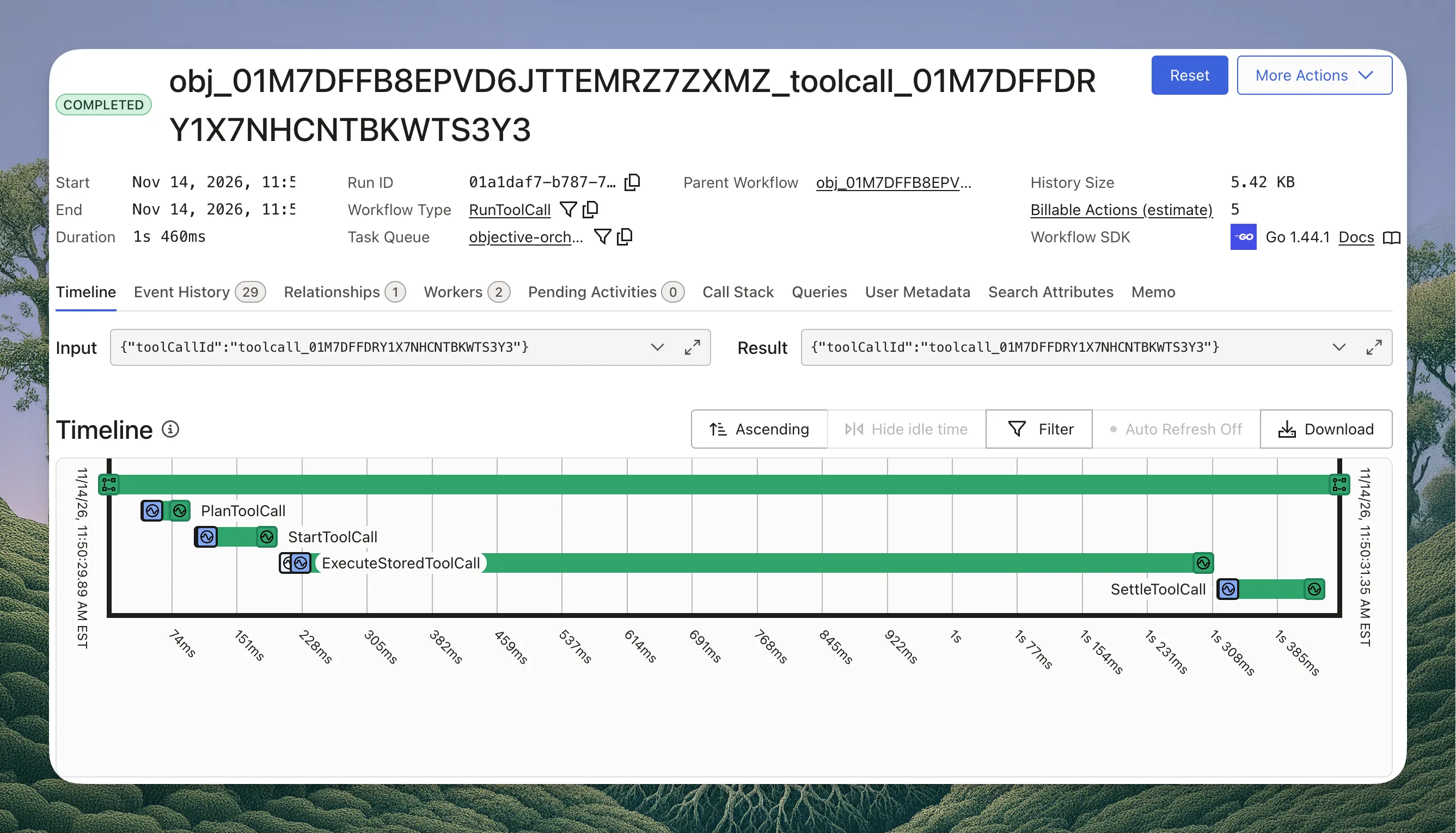
After the plan is generated, the Temporal workflow executes the StartToolCall activity. Tool call states are also stored as new objective_events records in postgres for when they start and complete. This is where we steal the prior art of the Objective status that starts a new postgres transaction, commits, and sends the side effect via our outbox relay.
The plan result is used to steer the rest of the RunToolCall’s behavior.
Basic: No Approval Needed
In the simplest scenario (just call the tool), we only need to change the tool’s state, execute the adapter (e.g. MCP) for the requested tool, and store the result of the tool call.
- Load the tool call from
objective_tool_callsusing the ID passed to the activity. - Load the tool definition from the
toolstable (using the foreign key from theobjective_tool_callsrecord) - Resolve the adapter we need to call (MCP, Secrets, Headers, etc.)
- Call the tool
- Store the result of the tool call in Google Cloud Storage, under a key built by convention from the objective ID and the tool call ID
- The next time the conversation is loaded for inference, cache the result with a short TTL in Redis (so loading conversation state is much faster after that first read)
sequenceDiagram
  participant W as RunToolCall workflow
  participant A as Activity
  participant DB as Postgres
  participant T as Tool (MCP server)
  participant G as Cloud Storage

  W->>A: PlanToolCall with the tool call ID
  A->>DB: Load the tool call, its tool, and its tool set
  A-->>W: Plan with adapter kind and no approval needed

  W->>A: StartToolCall with the tool call ID
  A->>DB: Mark the tool call as running
  A-->>W: Done

  W->>A: ExecuteStoredToolCall with the tool call ID
  A->>DB: Resolve the adapter, secrets, and headers
  A->>T: Call the tool
  T-->>A: Result content
  A->>G: Store the result content under a key built by convention
  A-->>W: Done, with no payload

  W->>A: SettleToolCall with the tool call ID
  A->>DB: Mark the tool call completed and write its events
  A-->>W: Done
The diagram could not be loaded. Its source is shown above.
Cadenya has a clever pattern where a tool call can return a list of other tools that should be added to the context on the next agent turn. This is what powers progressive discovery, and in cases where the tool result is hella long, we return a directive to load a built-in Cadenya tool called
read_tool_result. This prevents sending a 500k token input because a tool result was enormous. And it saves your budget.
Advanced: Approving a Tool
What about when a tool needs to be approved, though? This is where that Plan activity comes in handy, because it can change the shape of the workflow that needs to wait for a human to approve a tool.
Here’s a Temporal workflow for a RunToolCall that requires an approval:
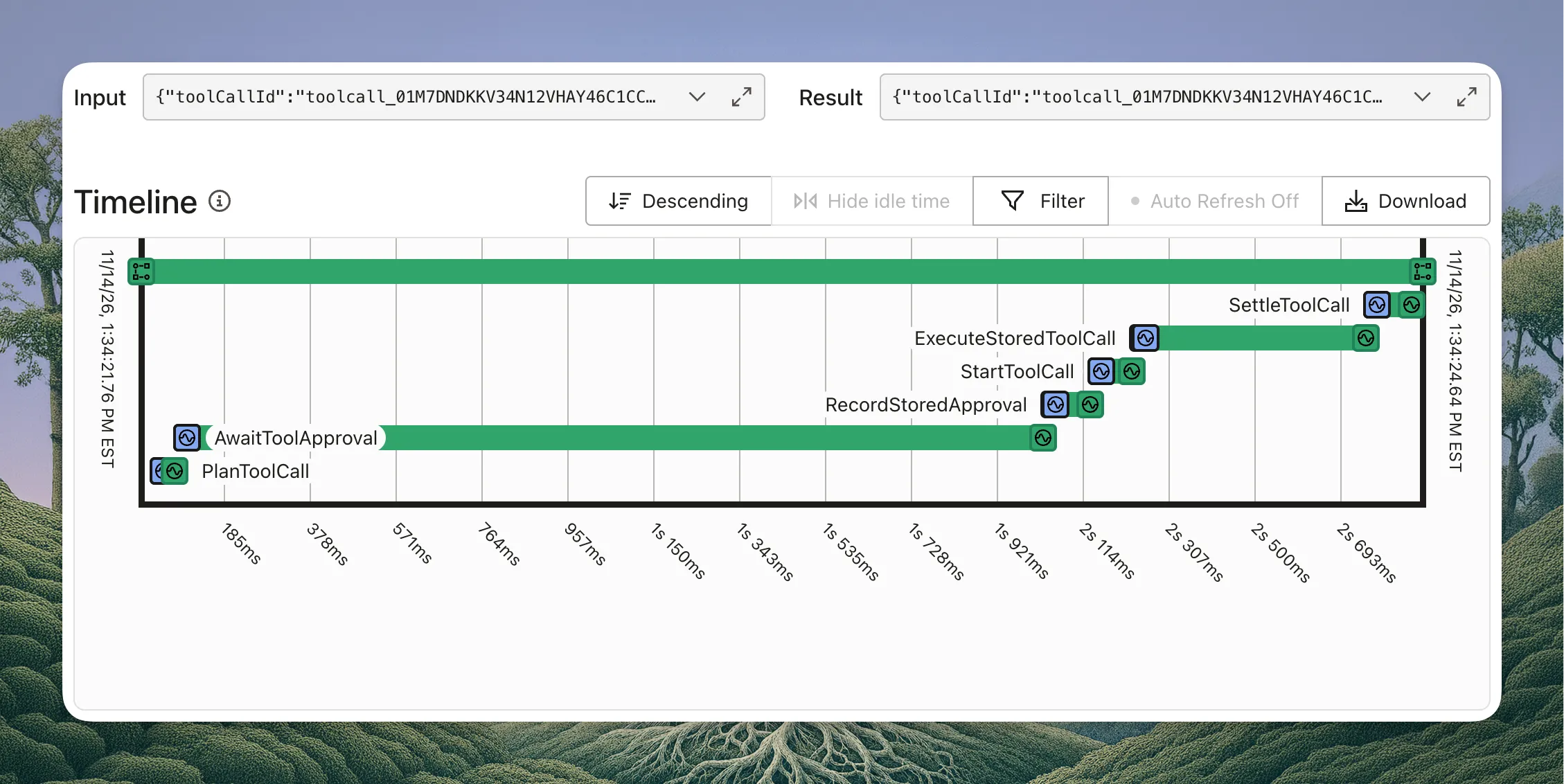
I’m sure people will tell me “You should use Workflow update handlers for approvals”, but my mental model prefers the Async Activity pattern that Temporal provides. The AwaitToolApproval activity stores the async token, fires the objective event, and then lets Temporal’s machinery “park” the activity.
// Flattened for this post, and showing only the human approval path.
func (a *Activities) AwaitToolApproval(ctx context.Context, ref *workflowpb.ToolCallReference) (*workflowpb.VetToolCallActivityOutput, error) {
	ctx, row, in, err := toolcallref.Load(ctx, a.db, ref)
	if err != nil {
		return nil, err
	}

	// A retry after the decision was already made just reports it.
	if row.GetStatus() == objectivetoolcall.StatusApproved || row.GetStatus() == objectivetoolcall.StatusDenied {
		return (&workflowpb.VetToolCallActivityOutput_builder{
			Approved: row.GetStatus() == objectivetoolcall.StatusApproved,
			Memo:     row.GetMemo(),
		}).Build(), nil
	}

	// Tell the world we're waiting. This is an objective event like any
	// other, so it goes through the outbox and out as a webhook.
	data := (&apiv1.ObjectiveEventData_builder{
		ToolApprovalRequested: (&apiv1.ToolApprovalRequested_builder{
			ToolCallId: row.GetID(),
		}).Build(),
	}).Build()
	_, err = a.eventRepo.CreateEvent(ctx, in.GetObjective(), (&apiv1.ObjectiveEvent_builder{
		ContextWindowId: in.GetContextWindowId(),
		Data:            data,
	}).Build())
	if err != nil {
		return nil, err
	}

	// Every running activity has a task token. Whoever holds it can finish
	// this activity later, from anywhere, so we put it on the tool call row.
	_, err = a.db.GetObjectiveToolCallClient().UpdateOneID(row.GetID()).
		SetTaskToken(activity.GetInfo(ctx).TaskToken).
		SetApprovalRequestedAt(time.Now()).
		Save(ctx)
	if err != nil {
		return nil, err
	}

	// Not an error. This tells Temporal "I'm not done, and I'm not coming
	// back". The worker is freed and the activity stays open, in our case
	// for up to 24 hours.
	return nil, activity.ErrResultPending
}
Then, in our API for Cadenya, we have a service that can mark the approval of a tool call:
// The other half lives in our API, behind the approve endpoint. It reads the
// task token back off the row and completes the parked activity with the
// decision, which becomes AwaitToolApproval's return value in the workflow.
func (r *repositoryDB) ApproveToolCall(ctx context.Context, req *apiv1.ApproveToolCallRequest) error {
	record, err := r.getPendingToolCall(ctx, req.GetToolCallId())
	if err != nil {
		return err
	}

	decision := (&objectiveworkflowsv1.VetToolCallActivityOutput_builder{
		Approved:  true,
		ProfileId: proto.String(servercontext.GetActor(ctx).ProfileID),
	}).Build()

	return r.temporal.CompleteActivity(ctx, *record.TaskToken, decision, nil)
}
This uses the Asynchronous Activity Completion API, and the result that is set using this is then returned to the outer RunToolCall workflow.
The entire sequence looks like this:
sequenceDiagram
  participant W as RunToolCall workflow
  participant A as Activity
  participant DB as Postgres
  participant T as Temporal
  participant API as Cadenya API
  participant H as Human

  W->>A: PlanToolCall with the tool call ID
  A-->>W: Plan says approval is required

  W->>A: AwaitToolApproval with the tool call ID
  A->>DB: Write the approval requested event (webhook goes out)
  A->>DB: Store the activity task token on the tool call
  A-->>T: Result pending, the activity stays open

  Note over W,T: Parked for up to 24 hours with no worker held

  H->>API: Approve the tool call
  API->>DB: Read the task token from the tool call
  API->>T: Complete the activity with the decision
  T-->>W: AwaitToolApproval returns the decision

  W->>A: RecordStoredApproval with the decision
  A->>DB: Set the tool call to approved
  A->>DB: Write the approved event (webhook goes out)
  A-->>W: Done

  Note over W,A: StartToolCall, ExecuteStoredToolCall, SettleToolCall as before
The diagram could not be loaded. Its source is shown above.
Queuing Messages for a Running Agent
A good agent runtime should allow users (machine or otherwise) to steer the agent by sending it messages. Waiting for the agent to complete its current turn, though, is a bad experience. Ideally, you should be able to queue messages the agent can pick up after its current turn is complete. This is a simple idea, but comes with complications. How do you make sure the agent always gets the queued messages? How do you ensure you don’t interrupt the current iteration and reorder the conversation history mistakenly? So many problems.
Cadenya solves this with a separate postgres table called objective_queued_actions. When a message arrives, the API locks the objective’s row and looks at its status:
- If the objective is
waiting, there is no workflow running. The message is appended directly toobjective_events, the objective moves topending, and anObjectiveContinuedmessage is written to the outbox, all in one transaction. The consumer of that message starts a newAgentObjectiveWorkflow. - If the objective is busy (
pending,running, orinterrupting) and the request setenqueue, the message is inserted intoobjective_queued_actionswith a status ofqueued. Withoutenqueue, the request is refused.
=> \d objective_queued_actions
                                        Table "public.objective_queued_actions"
       Column       |              Type              | Collation | Nullable |                 Default
--------------------+--------------------------------+-----------+----------+------------------------------------------
 id                 | text                           |           | not null |
 account_id         | text                           |           | not null |
 workspace_id       | text                           |           | not null |
 objective_id       | text                           |           | not null |
 type               | objective_queued_action_type   |           | not null |
 status             | objective_queued_action_status |           | not null | 'queued'::objective_queued_action_status
 data               | bytea                          |           | not null |
 profile_id         | text                           |           | not null |
 objective_event_id | text                           |           |          |
 sent_at            | timestamp with time zone       |           |          |
 claim_id           | text                           |           |          |
 created_at         | timestamp with time zone       |           | not null | now()
 updated_at         | timestamp with time zone       |           | not null | now()
Indexes:
    "objective_queued_actions_pkey" PRIMARY KEY, btree (id)
    "idx_objective_queued_actions_objective_id_claim_id" btree (objective_id, claim_id) WHERE claim_id IS NOT NULL
    "idx_objective_queued_actions_objective_id_status" btree (objective_id, status)
Foreign-key constraints:
    "objective_queued_actions_objective_event_id_fkey" FOREIGN KEY (objective_event_id) REFERENCES objective_events(id) ON DELETE SET NULL
    "objective_queued_actions_objective_id_fkey" FOREIGN KEY (objective_id) REFERENCES objectives(id) ON DELETE CASCADE
    "objective_queued_actions_profile_id_fkey" FOREIGN KEY (profile_id) REFERENCES profiles(id) ON DELETE CASCADE
The running workflow picks queued messages up with a ClaimQueuedActions activity at the boundary between turns, never in the middle of one. The claim takes the same lock on the objective’s row, creates the objective_events record for each message, and marks the queued action as sent. Because the message only enters the history at a turn boundary, it can never land between an assistant’s tool call and that tool’s result.
After a message is queued, the API also sends the workflow an action_queued signal once the transaction commits. The signal is best effort and only cuts a pause short, like an agent sitting in a wait tool call. If the signal is lost, the message is still claimed at the next turn boundary.
The last piece is what guarantees a message is never stranded. When a turn ends, the workflow claims one more time, and if nothing is queued, the objective is set to waiting in that same transaction. A message is either queued before that claim and picked up by it, or it arrives after and finds a waiting objective. The flow looks like this:
sequenceDiagram
  participant U as User
  participant API as Cadenya API
  participant DB as Postgres
  participant W as AgentObjectiveWorkflow

  U->>API: Send a message to the objective
  API->>DB: Lock the objective row and read its status

  alt Objective is waiting
      API->>DB: Append the user message to objective_events
      API->>DB: Set the objective to pending and write an outbox message
      DB-->>W: The ObjectiveContinued consumer starts a new workflow run
  else Objective is busy with a turn and the request asked to enqueue
      API->>DB: Insert into objective_queued_actions as queued
      API-->>W: Signal action_queued after the commit, best effort
      Note over W: The current Infer and tool calls finish first
      W->>DB: ClaimQueuedActions at the turn boundary
      DB-->>W: Message moved into objective_events, action marked sent
      W->>W: Next Infer sees the message
  end

  Note over DB,W: At the end of a turn the workflow claims once more
  W->>DB: ClaimQueuedActions, parking if nothing is queued
  DB-->>W: Nothing queued, objective set to waiting in the same transaction
The diagram could not be loaded. Its source is shown above.
The ClaimQueuedActions activity is simple enough, in that it returns directions back to the workflow on whether or not it should enqueue another inference call:
// Flattened for this post: the activity is a thin wrapper around this.
func (a *Activities) ClaimQueuedActions(ctx context.Context, input *objectiveworkflowsv1.ClaimQueuedActionsInput) (*objectiveworkflowsv1.ClaimQueuedActionsOutput, error) {
	tx, err := a.db.Tx(ctx)
	if err != nil {
		return nil, err
	}
	defer tx.Rollback()

	// The same row lock the API takes before it queues a message, so a
	// message is queued either before this claim or after it. Never during.
	record, err := tx.GetObjectiveClient().Query().
		Where(objective.IDEQ(input.GetObjectiveId())).
		ForUpdate().
		Only(ctx)
	if err != nil {
		return nil, err
	}

	// Temporal retries activities. If an earlier attempt of this exact claim
	// already committed, hand back the same batch instead of taking another.
	claimed, err := tx.GetObjectiveQueuedActionClient().Query().
		Where(
			objectivequeuedaction.ObjectiveIDEQ(record.GetID()),
			objectivequeuedaction.ClaimIDEQ(input.GetClaimId()),
		).
		Order(objectivequeuedaction.ByID(sql.OrderAsc())).
		All(ctx)
	if err != nil {
		return nil, err
	}
	if len(claimed) > 0 {
		return claimedBatch(claimed)
	}

	// Everything still queued for this objective, oldest first.
	queued, err := tx.GetObjectiveQueuedActionClient().Query().
		Where(
			objectivequeuedaction.ObjectiveIDEQ(record.GetID()),
			objectivequeuedaction.StatusEQ(objectivequeuedaction.StatusQueued),
		).
		Order(objectivequeuedaction.ByID(sql.OrderAsc())).
		All(ctx)
	if err != nil {
		return nil, err
	}

	// A batch stops at a queued compaction, so messages sent after it join
	// the compacted window instead of being summarized away.
	batch := batchOf(queued)

	// Nothing queued. At the end of a turn the workflow asks to park, and the
	// objective moves to WAITING in this same transaction.
	if len(batch) == 0 {
		out := new(objectiveworkflowsv1.ClaimQueuedActionsOutput)
		if input.GetPark() {
			if err := a.transitionStatus(ctx, tx, record, objective.StatusWaiting, "Waiting"); err != nil {
				return nil, err
			}
			out.SetParked(true)
		}
		return out, tx.Commit()
	}

	// Deliver the batch: each message becomes a real objective event in the
	// current context window, and its queued action is marked sent.
	for i, action := range batch {
		update := tx.GetObjectiveQueuedActionClient().UpdateOne(action).
			SetStatus(objectivequeuedaction.StatusSent).
			SetSentAt(time.Now()).
			SetClaimID(input.GetClaimId())

		// A compaction has no event. It is returned for the workflow to run.
		if data := conversationEventData(action.GetData().Message); data != nil {
			event, err := a.eventRepo.CreateEvent(ctx, record, (&apiv1.ObjectiveEvent_builder{
				ContextWindowId: input.GetContextWindowId(),
				Data:            data,
			}).Build())
			if err != nil {
				return nil, err
			}
			update.SetObjectiveEventID(event.GetID())
		}

		if batch[i], err = update.Save(ctx); err != nil {
			return nil, err
		}
	}
	if err := tx.Commit(); err != nil {
		return nil, err
	}

	// The directions for the workflow: how many messages were delivered (any
	// at all means run another turn) and whether a compaction should run.
	return claimedBatch(batch)
}
Compacting a Long-Running Agentic Loop
Long-horizon tasks for an AI Agent require a compaction feature at the runtime level. In Cadenya, compaction is triggered after a number of tokens is reached and crosses the threshold configured in the Agent variation. Using the TokenUsage that is returned from the Infer activity, our outer loop in the AgentObjectiveWorkflow calculates whether the threshold has been crossed, and schedules a new CompactContextWindowWorkflow child workflow.
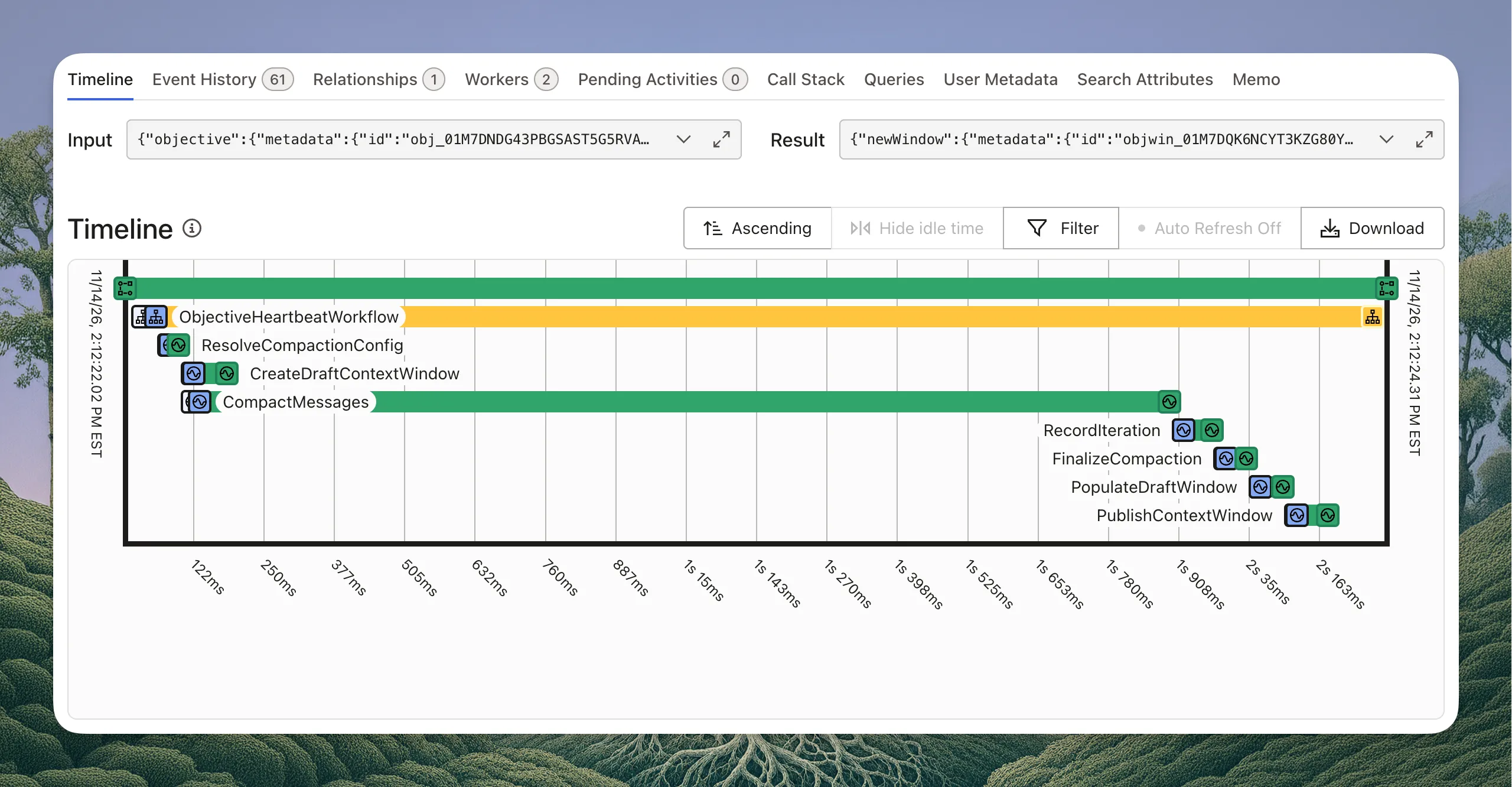
This workflow reads the current conversation state, sends a separate LLM completion request, and stores the output as the first message in a new objective_context_windows record that is assigned to the objectives record. The objective_events table has a foreign key that associates the events to the window, which allows Cadenya to show every event in a single timeline, while only sending messages for the current window to the LLM to continue long-horizon tasks.
For example, the table results might look like this:
=> SELECT id, status, current_context_window_id FROM objectives
   WHERE id = 'obj_01M7DFFB8EPVD6JTTEMRZ7ZXMZ';

               id               | status  |     current_context_window_id
--------------------------------+---------+-----------------------------------
 obj_01M7DFFB8EPVD6JTTEMRZ7ZXMZ | running | objwin_01M7DG4T6VQ0E8M3YK5RHB2NWZ
(1 row)

=> SELECT id, sequence, status FROM objective_context_windows
   WHERE objective_id = 'obj_01M7DFFB8EPVD6JTTEMRZ7ZXMZ' ORDER BY sequence;

                 id                | sequence |   status
-----------------------------------+----------+-----------
 objwin_01M7DFFB8FJ2K9W4C7NHX3T5RD |        1 | published
 objwin_01M7DG4T6VQ0E8M3YK5RHB2NWZ |        2 | published
(2 rows)

=> SELECT seq, objective_context_window_id, event_type FROM objective_events
   WHERE objective_id = 'obj_01M7DFFB8EPVD6JTTEMRZ7ZXMZ' AND seq > 83 ORDER BY seq;

 seq |    objective_context_window_id    |        event_type
-----+-----------------------------------+--------------------------
  84 | objwin_01M7DFFB8FJ2K9W4C7NHX3T5RD | reasoning
  85 | objwin_01M7DFFB8FJ2K9W4C7NHX3T5RD | assistant_message
  86 | objwin_01M7DFFB8FJ2K9W4C7NHX3T5RD | tool_result
  87 | objwin_01M7DG4T6VQ0E8M3YK5RHB2NWZ | context_window_compacted
  88 | objwin_01M7DG4T6VQ0E8M3YK5RHB2NWZ | user_message
  89 | objwin_01M7DG4T6VQ0E8M3YK5RHB2NWZ | assistant_message
(6 rows)
When reconstructing history to send to an LLM provider, the query always filters on the context window ID and the event_type enum, making it easy to find only the events that are needed to reconstruct the current window.
The Whole Agentic Loop in One Temporal Workflow
Every piece above hangs off a single loop. Here is the AgentObjectiveWorkflow with all of those pieces in place, trimmed down to the part that matters. I wrote this version for the post, so it skips interrupts, cancellation, iteration and tool call limits, and structured output. The shape is the real thing.
const iterationsPerExecution = 25

func AgentObjectiveWorkflow(ctx workflow.Context, input *objectiveworkflowsv1.AgentObjectiveWorkflowInput) (*objectiveworkflowsv1.AgentObjectiveWorkflowOutput, error) {
	objective := input.GetObjective()
	window := input.GetContextWindow()

	// Heartbeats run next to everything else until this run returns.
	stopHeartbeat := startObjectiveHeartbeat(ctx, objective)
	defer stopHeartbeat()

	// PENDING to RUNNING: the status, its event, and the outbox message.
	if err := updateStatus(ctx, objective, apiv1.ObjectiveState_OBJECTIVE_STATE_RUNNING); err != nil {
		return nil, err
	}

	// Model calls run on their own task queue, away from the orchestration.
	inferCtx := workflow.WithActivityOptions(ctx, workflow.ActivityOptions{
		TaskQueue:           taskqueues.ObjectiveInference,
		StartToCloseTimeout: 10 * time.Minute,
		HeartbeatTimeout:    5 * time.Second,
		RetryPolicy:         &temporal.RetryPolicy{MaximumAttempts: 5},
	})

	var err error
	for turn := range iterationsPerExecution {
		// Between turns: pull in anything queued while the agent was busy.
		// A queued compaction runs here too, and hands back the new window.
		window, _, err = claimQueuedActions(ctx, objective, window, neverPark)
		if err != nil {
			return nil, err
		}

		// One model call. Only references come back into workflow history.
		var inferred objectiveworkflowsv1.InferOutput
		err = workflow.ExecuteActivity(inferCtx, inference.Activity.Infer, (&objectiveworkflowsv1.InferInput_builder{
			ObjectiveId:     objective.GetMetadata().GetId(),
			ContextWindowId: window.GetMetadata().GetId(),
			IterationId:     fmt.Sprintf("agent-loop-%d", turn),
		}).Build()).Get(ctx, &inferred)
		if err != nil {
			return nil, failObjective(ctx, objective, err)
		}

		// The model asked for tools. Start one child workflow per tool call,
		// then wait for all of them, so they run in parallel.
		if inferred.GetStopReason() == objectiveworkflowsv1.StopReason_STOP_REASON_TOOL_CALLS {
			var toolCalls []workflow.ChildWorkflowFuture
			for _, id := range inferred.GetToolCallIds() {
				ref := (&objectiveworkflowsv1.ToolCallReference_builder{ToolCallId: id}).Build()
				toolCalls = append(toolCalls, workflow.ExecuteChildWorkflow(ctx, RunToolCall, ref))
			}
			for _, toolCall := range toolCalls {
				if err := toolCall.Get(ctx, nil); err != nil {
					return nil, failObjective(ctx, objective, err)
				}
			}
		}

		// The window is getting full. Summarize it and carry on in a new one.
		if compaction.ShouldCompact(objective, inferred.GetUsage(), inferred.GetMaxInputTokens()) {
			var compacted objectiveworkflowsv1.CompactContextWindowWorkflowOutput
			err = workflow.ExecuteChildWorkflow(ctx, CompactContextWindowWorkflow, (&objectiveworkflowsv1.CompactContextWindowWorkflowInput_builder{
				Objective:     objective,
				ContextWindow: window,
			}).Build()).Get(ctx, &compacted)
			if err != nil {
				return nil, failObjective(ctx, objective, err)
			}
			window = compacted.GetNewWindow()
		}

		// The model is done talking. Claim one last time: if a message was
		// queued during the turn, answer it. If not, the same transaction
		// parks the objective in WAITING and this run is over.
		if inferred.GetStopReason() == objectiveworkflowsv1.StopReason_STOP_REASON_END_TURN {
			var delivered int32
			window, delivered, err = claimQueuedActions(ctx, objective, window, parkWhenIdle)
			if err != nil {
				return nil, err
			}
			if delivered == 0 {
				return new(objectiveworkflowsv1.AgentObjectiveWorkflowOutput), nil
			}
		}
	}

	// Still going after 25 turns. Start a fresh run with an empty history
	// and pick up from the current context window.
	input.SetContextWindow(window)
	return nil, workflow.NewContinueAsNewError(ctx, AgentObjectiveWorkflow, input)
}
Ok, deep breath. Not that bad, right?
Wrapping Up
Temporal is an incredible piece of infrastructure to build agentic platforms with, and every Temporal AI agent we run leans on the same handful of workflows. Cadenya’s opinionated runtime leverages it to durably run workloads, enable human-in-the-loop approvals, and trigger compaction.
All you need to do now is point Cadenya at an MCP or API server, and watch it handle the entire agentic loop for you.
Grow wherever AI goes next.
Start shipping agents that are equipped to evolve.