> ## Documentation Index
> Fetch the complete documentation index at: https://cadenya.com/docs/llms.txt
> Use this file to discover all available pages before exploring further.
# Widgets
> The basics of how Widgets put Cadenya Agents in your web application
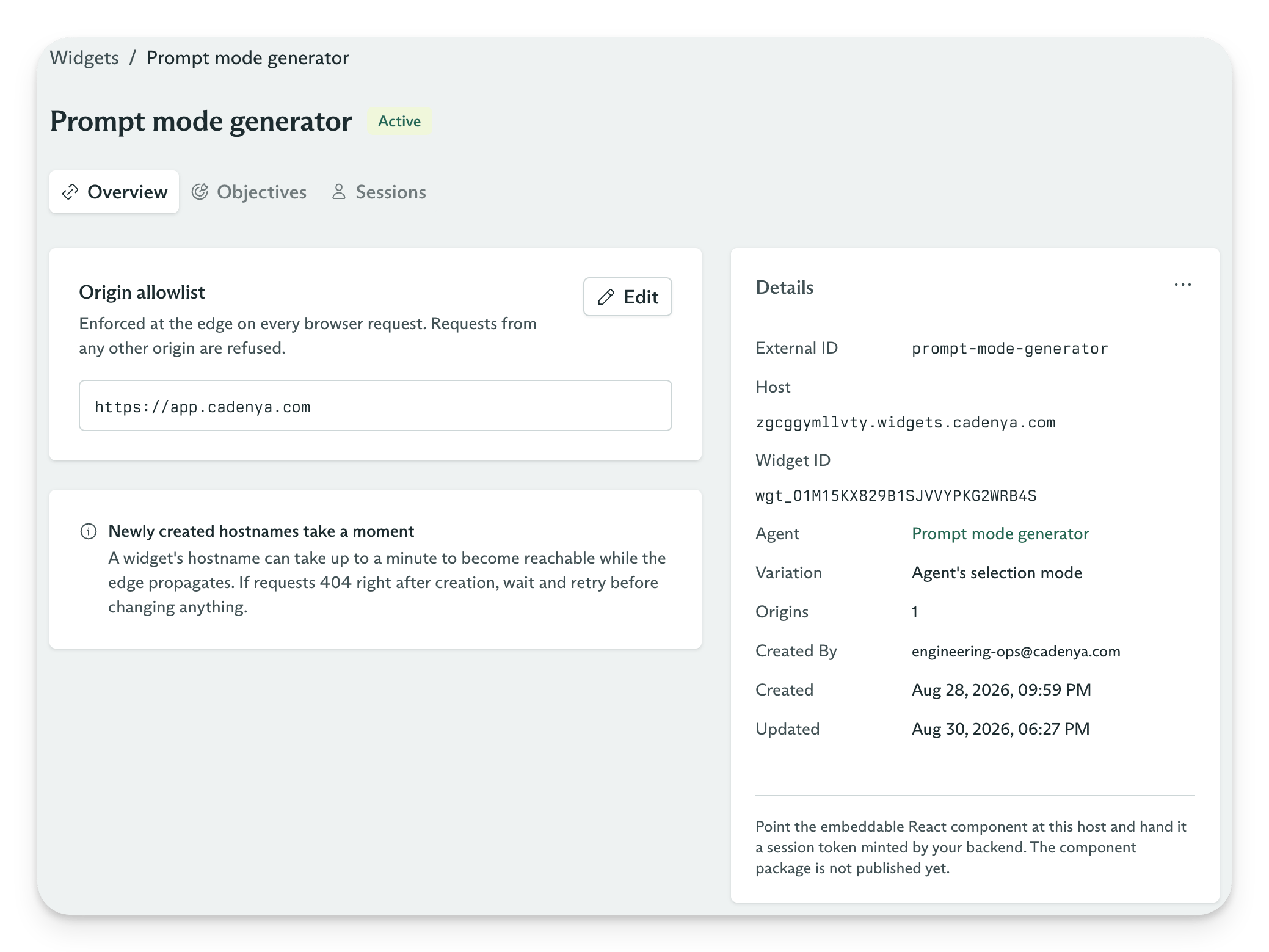
Widgets put a Cadenya Agent in your web application without making your backend proxy every conversation. You configure the Agent and the web origins that may use it, then Cadenya gives the Widget its own host, such as `adbtaawrmh4h.widgets.cadenya.com`.
Your backend has one job in the live conversation path: authenticate the visitor and mint a Widget Session. The browser receives the session's short-lived token and the Widget host. It then sends conversation requests and receives event streams from that host. Your Cadenya API key stays on your server, where it belongs.
## How Widgets work
Each Widget binds one [Agent](/docs/guides/the-basics/agents) to one host and one origin allowlist. A conversation created through the Widget becomes an [Objective](/docs/guides/the-basics/objectives) for that Agent. Cadenya derives the workspace, Agent, tenant, subject, secrets, and pinned parameters from the Widget Session instead of trusting values sent by the browser.
 ### 1. Mint a Widget Session
The frontend asks your backend for a Widget Session. Your backend authenticates the visitor, calls the Cadenya API with its private API key, and returns only the browser-safe token and host.
```mermaid theme={null}
sequenceDiagram
participant UI as React Widget UI
participant Backend as Your backend
participant API as Cadenya API
UI->>Backend: Request a Widget Session
Backend->>API: POST /v1/workspaces/{workspaceId}/widget_sessions
API-->>Backend: spec.token and info.host
Backend-->>UI: Token and host
```
### 2. Start conversations
The React UI uses `info.host` as its API base URL and sends the Widget Session token as a bearer token. Conversation requests and SSE events travel between the browser and the Widget host without passing through your backend.
```mermaid theme={null}
sequenceDiagram
participant UI as React Widget UI
participant Host as adbtaawrmh4h.widgets.cadenya.com
participant Agent as Cadenya Agent
UI->>Host: Create or continue a conversation with the bearer token
Host->>Agent: Create or continue an Objective
Agent-->>Host: Conversation events
Host-->>UI: Conversation and SSE events
```
The Widget host uses its DNS label to find the Widget, checks the request's `Origin` against the allowlist, and routes the request to the Cadenya environment that owns it. Always use `info.host` from the Widget Session response. Do not build the hostname from a Widget ID or DNS label.
## Configure a Widget
A Widget has three settings that shape new sessions:
1. **Agent:** The published Agent that handles conversations.
2. **Agent Variation:** An optional pin to one variation. Without a pin, the Agent's Variation Selection Mode chooses a variation for each conversation.
3. **Origin allowlist:** The exact web origins that may call the Widget host, including the scheme and optional port. Add `https://app.example.com`, not a path or wildcard.
Changing the Agent or pinned variation affects new Widget Sessions. Existing sessions keep the Agent binding they received when your backend minted them.
## Mint a Widget Session
Call [Create a widget session](/docs/api-reference/widgetsessionservice/create-a-widget-session) from your backend with an API key that has the `widget_sessions:manage` scope.
Never make this request from the browser because it requires your private Cadenya API key.
Choose the example for your backend. Each SDK client reads `CADENYA_API_KEY` and `CADENYA_WORKSPACE_ID` from the environment. Set `CADENYA_WIDGET_ID` to the Widget you want to embed.
```typescript Next.js theme={null}
// app/api/cadenya/widget-session/route.ts
import Cadenya from "@cadenya/cadenya";
export const runtime = "nodejs"; // The server SDK needs Node, not the Edge runtime.
export const dynamic = "force-dynamic"; // Never cache a minted token.
// The SDK reads CADENYA_API_KEY and CADENYA_WORKSPACE_ID from the environment.
// Module scope lets the route reuse the client across requests.
const client = new Cadenya();
export async function POST() {
// Identify the visitor from your own auth, not from the request body.
// const user = await getSession();
// if (!user) return new Response("Unauthorized", { status: 401 });
const result = await client.widgetSessions.create({
spec: {
widgetId: process.env.CADENYA_WIDGET_ID!,
// tenant: { id: user.orgId, name: user.orgName },
// subject: { id: user.id, name: user.name },
},
});
if (!result.info?.host) {
return new Response("Widget Session did not include a host", { status: 502 });
}
return Response.json(
{
token: result.spec.token,
host: result.info.host,
tokenExpiresAt: result.spec.tokenExpiresAt,
},
{ headers: { "Cache-Control": "no-store" } },
);
}
```
```typescript Fastify theme={null}
// src/routes/widget-session.ts
import Cadenya from "@cadenya/cadenya";
import type { FastifyPluginAsync } from "fastify";
const client = new Cadenya();
const widgetSessionRoutes: FastifyPluginAsync = async (app) => {
app.post("/api/cadenya/widget-session", async (_request, reply) => {
// Identify the visitor from your own auth, not from the request body.
// const user = await requireUser(request);
const result = await client.widgetSessions.create({
spec: {
widgetId: process.env.CADENYA_WIDGET_ID!,
// tenant: { id: user.orgId, name: user.orgName },
// subject: { id: user.id, name: user.name },
},
});
if (!result.info?.host) {
return reply.code(502).send({
error: "Widget Session did not include a host",
});
}
reply.header("Cache-Control", "no-store");
return {
token: result.spec.token,
host: result.info.host,
tokenExpiresAt: result.spec.tokenExpiresAt,
};
});
};
export default widgetSessionRoutes;
```
```ruby Ruby on Rails theme={null}
module Api
module Cadenya
class WidgetSessionsController < ApplicationController
def create
# Identify the visitor from your own auth, not from params.
# user = current_user!
client = ::Cadenya::Client.new
widget_session = client.widget_sessions.create(
spec: {
widget_id: ENV.fetch("CADENYA_WIDGET_ID"),
# tenant: { id: user.org_id, name: user.org_name },
# subject: { id: user.id, name: user.name },
},
)
if widget_session.info&.host.to_s.empty?
return render(
json: { error: "Widget Session did not include a host" },
status: :bad_gateway,
)
end
response.headers["Cache-Control"] = "no-store"
render json: {
token: widget_session.spec.token,
host: widget_session.info.host,
tokenExpiresAt: widget_session.spec.token_expires_at,
}
end
end
end
end
```
```go Go theme={null}
package widgets
import (
"encoding/json"
"net/http"
"os"
cadenya "go.cadenya.com/cadenya-go"
)
// Register this handler at POST /api/cadenya/widget-session.
func WidgetSessionHandler(client *cadenya.Client) http.HandlerFunc {
return func(w http.ResponseWriter, r *http.Request) {
if r.Method != http.MethodPost {
w.WriteHeader(http.StatusMethodNotAllowed)
return
}
// Identify the visitor from your own auth, not from the request body.
// user := UserFromContext(r.Context())
result, err := client.WidgetSessions().Create(
r.Context(),
(&cadenya.WidgetSessionCreateBuilder{}).
Spec(&cadenya.WidgetSessionSpecParam{
WidgetID: os.Getenv("CADENYA_WIDGET_ID"),
// Tenant: &cadenya.TenantAssertion{ID: user.OrgID},
// Subject: &cadenya.SubjectAssertion{ID: user.ID},
}).
ToParams(),
)
if err != nil {
http.Error(w, "Could not create a Widget Session", http.StatusBadGateway)
return
}
if result.Info == nil || result.Info.Host == "" || result.Spec == nil {
http.Error(w, "Widget Session did not include a host", http.StatusBadGateway)
return
}
w.Header().Set("Cache-Control", "no-store")
w.Header().Set("Content-Type", "application/json")
_ = json.NewEncoder(w).Encode(map[string]any{
"token": result.Spec.Token,
"host": result.Info.Host,
"tokenExpiresAt": result.Spec.TokenExpiresAt,
})
}
}
```
The token appears only in the create response. The browser does not need the session ID, workspace ID, or Cadenya API key.
Use your application's tenant and user IDs for the `tenant` and `subject` assertions. A subject keeps their conversation history across tabs and newly minted sessions for the same Widget. Without a subject, a session sees only the conversations it created.
## Add the React Widget UI
Install the React UI kit and its Radix Themes peer dependency:
```bash theme={null}
npm install @cadenya/widgets-ui-react @radix-ui/themes
```
`CadenyaWidgetProvider` creates the browser client and points it at the host returned by the Widget Session API. `ConversationsPanel` supplies the conversation list, message thread, composer, tool approvals, and live event stream.
```tsx theme={null}
"use client";
import { useCallback } from "react";
import { Theme } from "@radix-ui/themes";
import "@radix-ui/themes/styles.css";
import {
CadenyaWidgetProvider,
ConversationsPanel,
} from "@cadenya/widgets-ui-react";
import "@cadenya/widgets-ui-react/styles.css";
type WidgetCredentials = {
host: string;
token: string;
};
export function SupportWidget({
credentials,
}: {
credentials: WidgetCredentials;
}) {
const getToken = useCallback(async () => {
const response = await fetch("/api/cadenya/widget-session", {
method: "POST",
});
if (!response.ok) {
throw new Error("Could not create a Widget Session");
}
const next = (await response.json()) as WidgetCredentials;
return next.token;
}, []);
return (
);
}
```
The provider uses these properties:
* `host` sets the `@cadenya/widgets` client base URL to `https://{info.host}`.
* `token` supplies the Widget Session bearer token for browser requests.
* `getToken` calls your backend after a request returns `401`. The provider uses the new token and retries the request once.
The Widget host has no token refresh endpoint. `getToken` must call your backend, which authenticates the visitor again and creates another Widget Session. This keeps the Cadenya API key out of the browser and gives your application control over every token issuance.
If you want to build your own interface, use the lower-level [`@cadenya/widgets`](https://www.npmjs.com/package/@cadenya/widgets) SDK instead. It exposes the Widget config, conversations, events, tool approvals, browser-supplied Bare tool results, and feedback APIs.
## Pass trusted context into conversations
A Widget Session carries values that the browser must not choose. Cadenya applies them to every Objective created through the session:
* **Tenant and subject assertions** group conversations under identities from your application. Subjects require a tenant.
* **Secrets** let the Agent act with a visitor-specific credential. Cadenya encrypts the value and never returns it from an API.
* **Pinned parameters** force values onto matching tool arguments after the model makes a Tool Call. Use them for IDs such as an account or workspace that the visitor must not change.
* **Labels** add searchable metadata to every conversation created by the session.
Session secrets take precedence over Workspace and Tool Set secrets with the same name. This makes a short-lived user token a safe override for a shared integration credential.
## Session lifetime and revocation
A Widget Session token lasts about 15 minutes by default. The session lasts up to 24 hours by default and can issue conversation requests until it expires, reaches its message limit, or you revoke it. A token never outlives its session.
Revoking a session stops its outstanding tokens from authenticating and removes its secrets. Archiving a Widget removes its host from the edge and revokes its sessions. Mint a new session after you unarchive a Widget because revoked sessions stay revoked.
### 1. Mint a Widget Session
The frontend asks your backend for a Widget Session. Your backend authenticates the visitor, calls the Cadenya API with its private API key, and returns only the browser-safe token and host.
```mermaid theme={null}
sequenceDiagram
participant UI as React Widget UI
participant Backend as Your backend
participant API as Cadenya API
UI->>Backend: Request a Widget Session
Backend->>API: POST /v1/workspaces/{workspaceId}/widget_sessions
API-->>Backend: spec.token and info.host
Backend-->>UI: Token and host
```
### 2. Start conversations
The React UI uses `info.host` as its API base URL and sends the Widget Session token as a bearer token. Conversation requests and SSE events travel between the browser and the Widget host without passing through your backend.
```mermaid theme={null}
sequenceDiagram
participant UI as React Widget UI
participant Host as adbtaawrmh4h.widgets.cadenya.com
participant Agent as Cadenya Agent
UI->>Host: Create or continue a conversation with the bearer token
Host->>Agent: Create or continue an Objective
Agent-->>Host: Conversation events
Host-->>UI: Conversation and SSE events
```
The Widget host uses its DNS label to find the Widget, checks the request's `Origin` against the allowlist, and routes the request to the Cadenya environment that owns it. Always use `info.host` from the Widget Session response. Do not build the hostname from a Widget ID or DNS label.
## Configure a Widget
A Widget has three settings that shape new sessions:
1. **Agent:** The published Agent that handles conversations.
2. **Agent Variation:** An optional pin to one variation. Without a pin, the Agent's Variation Selection Mode chooses a variation for each conversation.
3. **Origin allowlist:** The exact web origins that may call the Widget host, including the scheme and optional port. Add `https://app.example.com`, not a path or wildcard.
Changing the Agent or pinned variation affects new Widget Sessions. Existing sessions keep the Agent binding they received when your backend minted them.
## Mint a Widget Session
Call [Create a widget session](/docs/api-reference/widgetsessionservice/create-a-widget-session) from your backend with an API key that has the `widget_sessions:manage` scope.
Never make this request from the browser because it requires your private Cadenya API key.
Choose the example for your backend. Each SDK client reads `CADENYA_API_KEY` and `CADENYA_WORKSPACE_ID` from the environment. Set `CADENYA_WIDGET_ID` to the Widget you want to embed.
```typescript Next.js theme={null}
// app/api/cadenya/widget-session/route.ts
import Cadenya from "@cadenya/cadenya";
export const runtime = "nodejs"; // The server SDK needs Node, not the Edge runtime.
export const dynamic = "force-dynamic"; // Never cache a minted token.
// The SDK reads CADENYA_API_KEY and CADENYA_WORKSPACE_ID from the environment.
// Module scope lets the route reuse the client across requests.
const client = new Cadenya();
export async function POST() {
// Identify the visitor from your own auth, not from the request body.
// const user = await getSession();
// if (!user) return new Response("Unauthorized", { status: 401 });
const result = await client.widgetSessions.create({
spec: {
widgetId: process.env.CADENYA_WIDGET_ID!,
// tenant: { id: user.orgId, name: user.orgName },
// subject: { id: user.id, name: user.name },
},
});
if (!result.info?.host) {
return new Response("Widget Session did not include a host", { status: 502 });
}
return Response.json(
{
token: result.spec.token,
host: result.info.host,
tokenExpiresAt: result.spec.tokenExpiresAt,
},
{ headers: { "Cache-Control": "no-store" } },
);
}
```
```typescript Fastify theme={null}
// src/routes/widget-session.ts
import Cadenya from "@cadenya/cadenya";
import type { FastifyPluginAsync } from "fastify";
const client = new Cadenya();
const widgetSessionRoutes: FastifyPluginAsync = async (app) => {
app.post("/api/cadenya/widget-session", async (_request, reply) => {
// Identify the visitor from your own auth, not from the request body.
// const user = await requireUser(request);
const result = await client.widgetSessions.create({
spec: {
widgetId: process.env.CADENYA_WIDGET_ID!,
// tenant: { id: user.orgId, name: user.orgName },
// subject: { id: user.id, name: user.name },
},
});
if (!result.info?.host) {
return reply.code(502).send({
error: "Widget Session did not include a host",
});
}
reply.header("Cache-Control", "no-store");
return {
token: result.spec.token,
host: result.info.host,
tokenExpiresAt: result.spec.tokenExpiresAt,
};
});
};
export default widgetSessionRoutes;
```
```ruby Ruby on Rails theme={null}
module Api
module Cadenya
class WidgetSessionsController < ApplicationController
def create
# Identify the visitor from your own auth, not from params.
# user = current_user!
client = ::Cadenya::Client.new
widget_session = client.widget_sessions.create(
spec: {
widget_id: ENV.fetch("CADENYA_WIDGET_ID"),
# tenant: { id: user.org_id, name: user.org_name },
# subject: { id: user.id, name: user.name },
},
)
if widget_session.info&.host.to_s.empty?
return render(
json: { error: "Widget Session did not include a host" },
status: :bad_gateway,
)
end
response.headers["Cache-Control"] = "no-store"
render json: {
token: widget_session.spec.token,
host: widget_session.info.host,
tokenExpiresAt: widget_session.spec.token_expires_at,
}
end
end
end
end
```
```go Go theme={null}
package widgets
import (
"encoding/json"
"net/http"
"os"
cadenya "go.cadenya.com/cadenya-go"
)
// Register this handler at POST /api/cadenya/widget-session.
func WidgetSessionHandler(client *cadenya.Client) http.HandlerFunc {
return func(w http.ResponseWriter, r *http.Request) {
if r.Method != http.MethodPost {
w.WriteHeader(http.StatusMethodNotAllowed)
return
}
// Identify the visitor from your own auth, not from the request body.
// user := UserFromContext(r.Context())
result, err := client.WidgetSessions().Create(
r.Context(),
(&cadenya.WidgetSessionCreateBuilder{}).
Spec(&cadenya.WidgetSessionSpecParam{
WidgetID: os.Getenv("CADENYA_WIDGET_ID"),
// Tenant: &cadenya.TenantAssertion{ID: user.OrgID},
// Subject: &cadenya.SubjectAssertion{ID: user.ID},
}).
ToParams(),
)
if err != nil {
http.Error(w, "Could not create a Widget Session", http.StatusBadGateway)
return
}
if result.Info == nil || result.Info.Host == "" || result.Spec == nil {
http.Error(w, "Widget Session did not include a host", http.StatusBadGateway)
return
}
w.Header().Set("Cache-Control", "no-store")
w.Header().Set("Content-Type", "application/json")
_ = json.NewEncoder(w).Encode(map[string]any{
"token": result.Spec.Token,
"host": result.Info.Host,
"tokenExpiresAt": result.Spec.TokenExpiresAt,
})
}
}
```
The token appears only in the create response. The browser does not need the session ID, workspace ID, or Cadenya API key.
Use your application's tenant and user IDs for the `tenant` and `subject` assertions. A subject keeps their conversation history across tabs and newly minted sessions for the same Widget. Without a subject, a session sees only the conversations it created.
## Add the React Widget UI
Install the React UI kit and its Radix Themes peer dependency:
```bash theme={null}
npm install @cadenya/widgets-ui-react @radix-ui/themes
```
`CadenyaWidgetProvider` creates the browser client and points it at the host returned by the Widget Session API. `ConversationsPanel` supplies the conversation list, message thread, composer, tool approvals, and live event stream.
```tsx theme={null}
"use client";
import { useCallback } from "react";
import { Theme } from "@radix-ui/themes";
import "@radix-ui/themes/styles.css";
import {
CadenyaWidgetProvider,
ConversationsPanel,
} from "@cadenya/widgets-ui-react";
import "@cadenya/widgets-ui-react/styles.css";
type WidgetCredentials = {
host: string;
token: string;
};
export function SupportWidget({
credentials,
}: {
credentials: WidgetCredentials;
}) {
const getToken = useCallback(async () => {
const response = await fetch("/api/cadenya/widget-session", {
method: "POST",
});
if (!response.ok) {
throw new Error("Could not create a Widget Session");
}
const next = (await response.json()) as WidgetCredentials;
return next.token;
}, []);
return (
);
}
```
The provider uses these properties:
* `host` sets the `@cadenya/widgets` client base URL to `https://{info.host}`.
* `token` supplies the Widget Session bearer token for browser requests.
* `getToken` calls your backend after a request returns `401`. The provider uses the new token and retries the request once.
The Widget host has no token refresh endpoint. `getToken` must call your backend, which authenticates the visitor again and creates another Widget Session. This keeps the Cadenya API key out of the browser and gives your application control over every token issuance.
If you want to build your own interface, use the lower-level [`@cadenya/widgets`](https://www.npmjs.com/package/@cadenya/widgets) SDK instead. It exposes the Widget config, conversations, events, tool approvals, browser-supplied Bare tool results, and feedback APIs.
## Pass trusted context into conversations
A Widget Session carries values that the browser must not choose. Cadenya applies them to every Objective created through the session:
* **Tenant and subject assertions** group conversations under identities from your application. Subjects require a tenant.
* **Secrets** let the Agent act with a visitor-specific credential. Cadenya encrypts the value and never returns it from an API.
* **Pinned parameters** force values onto matching tool arguments after the model makes a Tool Call. Use them for IDs such as an account or workspace that the visitor must not change.
* **Labels** add searchable metadata to every conversation created by the session.
Session secrets take precedence over Workspace and Tool Set secrets with the same name. This makes a short-lived user token a safe override for a shared integration credential.
## Session lifetime and revocation
A Widget Session token lasts about 15 minutes by default. The session lasts up to 24 hours by default and can issue conversation requests until it expires, reaches its message limit, or you revoke it. A token never outlives its session.
Revoking a session stops its outstanding tokens from authenticating and removes its secrets. Archiving a Widget removes its host from the edge and revokes its sessions. Mint a new session after you unarchive a Widget because revoked sessions stay revoked.