> ## Documentation Index
> Fetch the complete documentation index at: https://cadenya.com/docs/llms.txt
> Use this file to discover all available pages before exploring further.

# Objectives

> The basics of how Objectives work in Cadenya

Objectives put your Agents into action. When you create an Objective, Cadenya starts a new agentic loop with the tools, prompts, and rules configured on the selected Agent Variation.

## Create an Objective

Before you create an Objective:

1. Created an Agent
2. Created at least one Agent Variation for it

Objectives **do not** require tools assigned to the Agent Variation. Text-based Agents may need only the context provided by memory or prompts.

Assuming you've installed the Cadenya CLI, you can create a new objective with your agent ID and simple data below:

```bash Cadenya CLI theme={null}
cadenya objectives create \
  --agent-id petstore-agent \
  --system-prompt-data '{}' \
  --first-user-message 'Find all pets with status available and summarize them by category.'
```

The response looks like this:

<CodeBlock language="text" nocopy={true}>
  ID                              EXTERNAL ID  CREATED                         STATE
  obj\_01M11M39G1AND50FXH9P39ZSR2               2026-08-27T12:46:10.945865636Z  STATE\_PENDING
</CodeBlock>

### Create an Objective with an External ID

Use an External ID to prevent duplicate Objectives for a workflow or record in your application. You can also retrieve the Objective by this value, which makes scripts straightforward:

```bash theme={null}
  EXTERNAL_ID="my-own-id-$(date +%s)"

  cadenya objectives create \
    --agent-id petstore-agent \
    --system-prompt-data '{}' \
    --metadata "{\"externalId\": \"$EXTERNAL_ID\"}" \
    --first-user-message 'Find all pets with status available and summarize them by category.'

  cadenya objectives stream-events $EXTERNAL_ID
```

<Info>
  Cadenya IDs use a prefixed ULID. If an ID does not begin with the expected prefix, such as `obj_`, Cadenya treats it as your `externalId` value.
</Info>

### Passing in custom data

Objectives can store unstructured data for:

* System prompt data
* First user message data

This data lets your Agent prompts render content from values you provide at dispatch time. You might include details such as:

* The user's name and email
* Recent purchases
* Custom object details for data classification tasks

The world's your oyster here.

For example, your agent variation may have these prompts configured:

<CodeGroup>
  ```text System Prompt theme={null}
  You are a {{ system_prompt_data.role }} agent for {{ system_prompt_data.company }}.
  ```

  ```text First User Message Prompt theme={null}
  The customer asks: {{ first_user_message_data.question }}
  ```
</CodeGroup>

You'd be able to insert these template values like so:

<CodeGroup>
  ```bash CLI theme={null}
  cadenya objectives create \
      --agent-id external_id:my-agent \
      --system-prompt-data '{"company":"Acme","role":"support"}' \
      --first-user-message-data '{"question":"Where is my order?"}'
  ```

  ```bash cURL theme={null}
  curl --request POST \
    "https://api.cadenya.com/v1/workspaces/${CADENYA_WORKSPACE_ID}/objectives" \
    --header "Authorization: Bearer ${CADENYA_API_KEY}" \
    --header "Content-Type: application/json" \
    --data '{
      "agentId": "external_id:my-agent",
      "systemPromptData": {
        "company": "Acme",
        "role": "support"
      },
      "firstUserMessageData": {
        "question": "Where is my order?"
      }
    }'
  ```
</CodeGroup>

Every Cadenya SDK supports these fields. See the documentation for your SDK.

## Secrets

Objectives can store secrets for **only** the Agent loop that owns them. Use these secrets for:

* Short-lived tokens that can access an API (for example, a JWT minted to act on behalf of a user)
* Other authorization credentials (like Cloudflare tunnels)

<Tip>Objective secrets have the highest precedence in Cadenya. If a name duplicates a Tool Set Secret or Workspace Secret, **the Objective Secret wins.**</Tip>

To create an objective with secrets using the CLI or HTTP API:

<CodeGroup>
  ```bash CLI theme={null}
  cadenya objectives create \
    --agent-id external_id:shipment-support \
    --system-prompt-data '{}' \
    --first-user-message "Investigate why shipment SHP-1042 is delayed and recommend the next action." \
    --secrets '{"name":"CARRIER_API_TOKEN","value":"carrier-token"}'
  ```

  ```bash cURL theme={null}
  curl --request POST \
      "https://api.cadenya.com/v1/workspaces/${CADENYA_WORKSPACE_ID}/objectives" \
      --header "Authorization: Bearer ${CADENYA_API_KEY}" \
      --header "Content-Type: application/json" \
      --data '{
        "agentId": "external_id:shipment-support",
        "systemPromptData": {},
        "firstUserMessage": "Investigate why shipment SHP-1042 is delayed and recommend the next action.",
        "secrets": [
          {
            "name": "CARRIER_API_TOKEN",
            "value": "carrier-token"
          }
        ]
      }'
  ```
</CodeGroup>

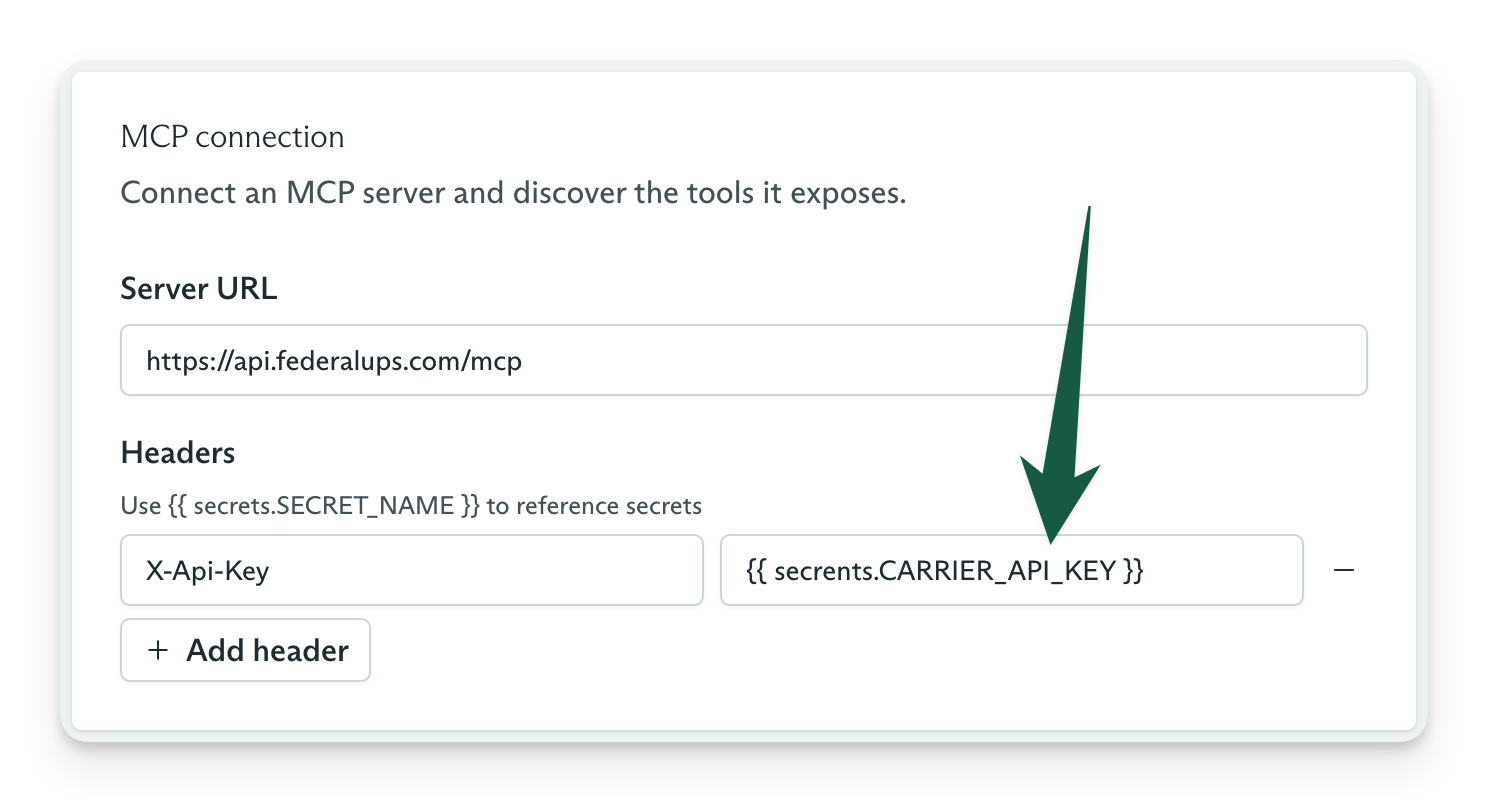
In your Tool Set's adapter configuration, you can set headers that reference these secrets. The format is:

```
{{ secrets.CARRIER_API_TOKEN }}
```

<Frame caption="Referencing a secret in an MCP tool set">
  <img src="https://mintcdn.com/cadenya/kKA_S_Ik1uU02mVT/images/guides/the-basics/headers-secrets.png?fit=max&auto=format&n=kKA_S_Ik1uU02mVT&q=85&s=80a1bef56fc95447afac77b0c132e6a8" style={{width: "90%", height: "auto"}} width="1488" height="802" data-path="images/guides/the-basics/headers-secrets.png" />
</Frame>

## Tenants and subjects

Cadenya allows you to segment your Objective data by Tenants (account and workspaces) and even Subjects (users, keys, etc). This allows you to purge data in Cadenya for a tenant, or filter using the API with the IDs you supply.

### Tenants

To provide a tenant and subject when you create an Objective, pass an assertion for each one. These records **do not** need to exist in Cadenya first. Cadenya creates the record or updates it when the ID already exists.

<CodeGroup>
  ```bash CLI theme={null}
  cadenya objectives create \
    --agent-id agent_01KZW92AY9D8CN65KV84P9ZNP8 \
    --system-prompt-data '{}' \
    --first-user-message "generate a fake persons name" \
    --tenant '{"id":"acme-corp","name":"Acme Corp"}'
  ```

  ```bash cURL theme={null}
  curl --request POST \
      "https://api.cadenya.com/v1/workspaces/${CADENYA_WORKSPACE_ID}/objectives" \
      --header "Authorization: Bearer ${CADENYA_API_KEY}" \
      --header "Content-Type: application/json" \
      --data '{
        "agentId": "agent_01KZW92AY9D8CN65KV84P9ZNP8",
        "systemPromptData": {},
        "firstUserMessage": "generate a fake persons name",
        "tenant": {
          "id": "acme-corp",
          "name": "Acme Corp"
        }
      }'
  ```
</CodeGroup>

Then, to filter objectives by a tenant, you can use:

<CodeGroup>
  ```bash CLI theme={null}
  cadenya objectives list --tenant-id external_id:acme-corp
  ```

  ```bash cURL theme={null}
  curl --get \
    "https://api.cadenya.com/v1/workspaces/${CADENYA_WORKSPACE_ID}/objectives" \
    --header "Authorization: Bearer ${CADENYA_API_KEY}" \
    --data-urlencode "tenantId=external_id:acme-corp"
  ```
</CodeGroup>

### Subjects

Subjects are similar to tenants and are scoped to the supplied tenant. Subject assertions require a tenant assertion. This prevents free-floating subjects without a tenant. If your subjects do not have a
natural tenant, use a generic tenant ID such as default.

<CodeGroup>
  ```bash CLI theme={null}
  cadenya objectives create \
    --agent-id agent_01KZW92AY9D8CN65KV84P9ZNP8 \
    --system-prompt-data '{}' \
    --first-user-message "generate a fake persons name" \
    --tenant '{"id":"acme-corp","name":"Acme Corp"}' \
    --subject '{"id":"user-123","name":"Jane Doe"}'
  ```

  ```bash cURL theme={null}
  curl --request POST \
    "https://api.cadenya.com/v1/workspaces/${CADENYA_WORKSPACE_ID}/objectives" \
    --header "Authorization: Bearer ${CADENYA_API_KEY}" \
    --header "Content-Type: application/json" \
    --data '{
      "agentId": "agent_01KZW92AY9D8CN65KV84P9ZNP8",
      "systemPromptData": {},
      "firstUserMessage": "generate a fake persons name",
      "tenant": {
        "id": "acme-corp",
        "name": "Acme Corp"
      },
      "subject": {
        "id": "user-123",
        "name": "Jane Doe"
      }
    }'
  ```
</CodeGroup>

To filter objectives by subject, include its tenant because subject IDs are scoped to a tenant:

<CodeGroup>
  ```bash CLI theme={null}
  cadenya objectives list \
    --tenant-id external_id:acme-corp \
    --subject-id external_id:user-123
  ```

  ```bash cURL theme={null}
  curl \
    "https://api.cadenya.com/v1/workspaces/${CADENYA_WORKSPACE_ID}/objectives?tenantId=external_id:acme-corp&subjectId=external_id:user-123" \
    --header "Authorization: Bearer ${CADENYA_API_KEY}"
  ```
</CodeGroup>

<Tip>To update a name for a Tenant or Subject, pass a new name with the same ID on your next object.</Tip>

## Variation selection

When you create an Objective with only `agentId`, Cadenya chooses an Agent Variation using the agent's Variation Selection Mode. Random gives each variation equal odds. Weighted uses feedback to favor variations that score well.

Pass `variationId` when you need one known configuration, such as for a regression test or model comparison. The value overrides the agent's selection mode for that Objective.

<CodeGroup>
  ```bash CLI theme={null}
  cadenya objectives create \
    --agent-id external_id:conference-attendee-generator \
    --variation-id external_id:detailed \
    --system-prompt-data '{}' \
    --first-user-message "Create three attendee profiles for a developer conference."
  ```

  ```bash cURL theme={null}
  curl --request POST \
    "https://api.cadenya.com/v1/workspaces/${CADENYA_WORKSPACE_ID}/objectives" \
    --header "Authorization: Bearer ${CADENYA_API_KEY}" \
    --header "Content-Type: application/json" \
    --data '{
      "agentId": "external_id:conference-attendee-generator",
      "variationId": "external_id:detailed",
      "systemPromptData": {},
      "firstUserMessage": "Create three attendee profiles for a developer conference."
    }'
  ```
</CodeGroup>

<Info>
  Cadenya selects the variation once when it creates the Objective. The Objective keeps that variation's configuration snapshot even if you edit the variation later.
</Info>

### Objective feedback

Cadenya collects feedback on an Objective's performance and outcome. Use the Feedback API to provide a score and optional comment.

Feedback has the most impact when you set the Agent's Variation Selection Mode to `weighted`. Cadenya uses [Thompson sampling](https://en.wikipedia.org/wiki/Thompson_sampling) to favor variations that score well.

Scores range from `-1` to `1` and can include decimals. If an Objective did a "meh but acceptable" job, you might give it a score of `0.5`. If it got the result wrong, give it a score of `-1` to scold it for what it did.

<CodeGroup>
  ```bash CLI theme={null}
  cadenya objectives create-feedback obj_01M11M39G1AND50FXH9P39ZSR2 \
    --metadata '{}' \
    --data '{"score":0.5,"comment":"The result was useful, but it missed one requested field."}'
  ```

  ```bash cURL theme={null}
  curl --request POST \
    "https://api.cadenya.com/v1/workspaces/${CADENYA_WORKSPACE_ID}/objectives/obj_01M11M39G1AND50FXH9P39ZSR2/feedback" \
    --header "Authorization: Bearer ${CADENYA_API_KEY}" \
    --header "Content-Type: application/json" \
    --data '{
      "metadata": {},
      "data": {
        "score": 0.5,
        "comment": "The result was useful, but it missed one requested field."
      }
    }'
  ```
</CodeGroup>

## Objective events

Every Objective carries a durable event log of its agent loop. You can list stored events after a run or stream new events while the Objective works. Each event includes metadata, a `contextWindowId`, and one typed `data` payload. Work that takes measurable time also includes `startedAt` and `duration`.

### Read stored events

List events in ascending order to replay the Objective from its first event:

<CodeGroup>
  ```bash CLI theme={null}
  cadenya objectives list-events obj_01M11M39G1AND50FXH9P39ZSR2 \
    --sort-order asc
  ```

  ```bash cURL theme={null}
  curl --get \
    "https://api.cadenya.com/v1/workspaces/${CADENYA_WORKSPACE_ID}/objectives/obj_01M11M39G1AND50FXH9P39ZSR2/events" \
    --header "Authorization: Bearer ${CADENYA_API_KEY}" \
    --data-urlencode "sortOrder=asc"
  ```
</CodeGroup>

### Stream new events

The stream uses server-sent events and stays open until the Objective reaches a terminal state or the connection closes:

<CodeGroup>
  ```bash CLI theme={null}
  cadenya objectives stream-events obj_01M11M39G1AND50FXH9P39ZSR2
  ```

  ```bash cURL theme={null}
  curl --no-buffer \
    "https://api.cadenya.com/v1/workspaces/${CADENYA_WORKSPACE_ID}/objectives/obj_01M11M39G1AND50FXH9P39ZSR2/events:stream" \
    --header "Authorization: Bearer ${CADENYA_API_KEY}" \
    --header "Accept: text/event-stream"
  ```
</CodeGroup>

### Event types

Use `data.type` to choose the matching payload in `data`.

<table className="objective-events-table">
  <thead>
    <tr>
      <th><code>data.type</code></th>
      <th>What the event records</th>
    </tr>
  </thead>

  <tbody>
    <tr>
      <td><code>userMessage</code></td>
      <td>A user message enters the Objective's chat history.</td>
    </tr>

    <tr>
      <td><code>assistantMessage</code></td>
      <td>The model returns assistant content or requests tool calls.</td>
    </tr>

    <tr>
      <td><code>reasoning</code></td>
      <td>The model returns reasoning text or a provider-generated reasoning summary. This text does not return to the model.</td>
    </tr>

    <tr>
      <td><code>toolApprovalRequested</code></td>
      <td>A tool call pauses and waits for approval. Use its <code>toolCallId</code> to approve or deny the call.</td>
    </tr>

    <tr>
      <td><code>toolApproved</code></td>
      <td>A reviewer approves a waiting tool call.</td>
    </tr>

    <tr>
      <td><code>toolDenied</code></td>
      <td>A reviewer denies a waiting tool call. The payload includes the reviewer's memo.</td>
    </tr>

    <tr>
      <td><code>toolCalled</code></td>
      <td>Cadenya executes a tool call and records its tool, configuration, and arguments.</td>
    </tr>

    <tr>
      <td><code>toolResult</code></td>
      <td>A tool call completes and returns content.</td>
    </tr>

    <tr>
      <td><code>toolError</code></td>
      <td>A tool call fails and returns an error message.</td>
    </tr>

    <tr>
      <td><code>memoryRead</code></td>
      <td>The agent resolves a key against the Memory Cascade and loads an entry. A lookup that misses does not emit this event.</td>
    </tr>

    <tr>
      <td><code>contextWindowCompacted</code></td>
      <td>Compaction creates a new Context Window. The payload names the strategies used and the number of messages compacted.</td>
    </tr>

    <tr>
      <td><code>subAgentSpawned</code></td>
      <td>The parent Objective spawns a Sub-Objective and records its task, Agent, and Objective.</td>
    </tr>

    <tr>
      <td><code>subAgentUpdated</code></td>
      <td>A Sub-Objective changes state. The payload includes its status and an optional message.</td>
    </tr>

    <tr>
      <td><code>notice</code></td>
      <td>The runtime reports a non-terminal diagnostic, such as a Tool Set that failed to load.</td>
    </tr>

    <tr>
      <td><code>error</code></td>
      <td>The Objective encounters an execution error. The payload includes an error type and message.</td>
    </tr>

    <tr>
      <td><code>cancelled</code></td>
      <td>The Objective is cancelled and enters a terminal state.</td>
    </tr>

    <tr>
      <td><code>timedOut</code></td>
      <td>The Objective reaches its inactivity limit and enters a terminal state without output.</td>
    </tr>

    <tr>
      <td><code>finalized</code></td>
      <td>The Objective completes in a terminal state. The payload includes structured output when the Agent defines it.</td>
    </tr>
  </tbody>
</table>

## Continue an Objective

Objectives can also support conversations. When an Objective enters `STATE_WAITING`, send a Continue message from your user to resume the Agent loop.

<CodeGroup>
  ```bash CLI theme={null}
  cadenya objectives continue obj_01M11M39G1AND50FXH9P39ZSR2 \
    --message "Which result would you recommend?"
  ```

  ```bash cURL theme={null}
  curl --request POST \
    "https://api.cadenya.com/v1/workspaces/${CADENYA_WORKSPACE_ID}/objectives/obj_01M11M39G1AND50FXH9P39ZSR2:continue" \
    --header "Authorization: Bearer ${CADENYA_API_KEY}" \
    --header "Content-Type: application/json" \
    --data '{
      "message": "Which result would you recommend?"
    }'
  ```
</CodeGroup>

## Retrieving structured output

If your Agent has Structured Output enabled, the Objective ends with a JSON object stored on it. Structured output works well when you use an Agent to classify data, write an email, or handle other small, discrete tasks that require the reasoning power of an LLM.

Retrieve the `output` field from the Objective:

<CodeGroup>
  ```bash CLI theme={null}
  cadenya objectives retrieve obj_01M11M39G1AND50FXH9P39ZSR2 \
    --display json | jq '.output'
  ```

  ```bash cURL theme={null}
  curl --silent \
    "https://api.cadenya.com/v1/workspaces/${CADENYA_WORKSPACE_ID}/objectives/obj_01M11M39G1AND50FXH9P39ZSR2" \
    --header "Authorization: Bearer ${CADENYA_API_KEY}" | jq '.output'
  ```
</CodeGroup>

## Approve or deny tools

If a tool requires approval, Cadenya parks the Agent loop until it receives approval or a denial with optional steering. Multiple tools can wait at the same time. Every Tool Call in Cadenya receives a `toolcall_`-prefixed ID that you use to record a decision. Pair webhooks or SSE with tool approvals to create real-time agentic experiences with Cadenya.

<CodeGroup>
  ```bash CLI theme={null}
  cadenya objectives list-tool-calls obj_01M11M39G1AND50FXH9P39ZSR2 \
    --status TOOL_CALL_STATUS_WAITING_FOR_APPROVAL
  ```

  ```bash cURL theme={null}
  curl --get \
    "https://api.cadenya.com/v1/workspaces/${CADENYA_WORKSPACE_ID}/objectives/obj_01M11M39G1AND50FXH9P39ZSR2/tool_calls" \
    --header "Authorization: Bearer ${CADENYA_API_KEY}" \
    --data-urlencode "status=TOOL_CALL_STATUS_WAITING_FOR_APPROVAL"
  ```
</CodeGroup>

Once you know which Tool Calls are waiting for a decision, approve one with:

<CodeGroup>
  ```bash CLI theme={null}
  cadenya objectives approve-tool-call \
    obj_01M11M39G1AND50FXH9P39ZSR2 \
    toolcall_01HXKD2E5NQM3T9AYWCFTANFGV
  ```

  ```bash cURL theme={null}
  curl --request POST \
    "https://api.cadenya.com/v1/workspaces/${CADENYA_WORKSPACE_ID}/objectives/obj_01M11M39G1AND50FXH9P39ZSR2/tool_calls/toolcall_01HXKD2E5NQM3T9AYWCFTANFGV:approve" \
    --header "Authorization: Bearer ${CADENYA_API_KEY}" \
    --header "Content-Type: application/json" \
    --data '{}'
  ```
</CodeGroup>

If the Tool Call or its arguments are unacceptable, deny it and steer the Agent:

<CodeGroup>
  ```bash CLI theme={null}
  cadenya objectives deny-tool-call \
    obj_01M11M39G1AND50FXH9P39ZSR2 \
    toolcall_01HXKD2E5NQM3T9AYWCFTANFGV \
    --memo "Use the read-only lookup tool instead."
  ```

  ```bash cURL theme={null}
  curl --request POST \
    "https://api.cadenya.com/v1/workspaces/${CADENYA_WORKSPACE_ID}/objectives/obj_01M11M39G1AND50FXH9P39ZSR2/tool_calls/toolcall_01HXKD2E5NQM3T9AYWCFTANFGV:deny" \
    --header "Authorization: Bearer ${CADENYA_API_KEY}" \
    --header "Content-Type: application/json" \
    --data '{
      "memo": "Use the read-only lookup tool instead."
    }'
  ```
</CodeGroup>

## Lifecycle

Objectives in Cadenya can do a *lot* of work. An Objective moves through several lifecycle states, including four terminal states. Once it enters a terminal state, it is gone, deceased, donezo. It is done.

```mermaid theme={null}
stateDiagram-v2
  direction LR

  state "STATE_PENDING" as Pending
  state "STATE_RUNNING" as Running
  state "STATE_WAITING" as Waiting
  state "Terminal state" as Terminal

  [*] --> Pending: Objective created
  Pending --> Running: Execution starts
  Running --> Waiting: Turn completes
  Waiting --> Running: Continue
  Pending --> Terminal: Fail or cancel
  Running --> Terminal: Finalize, fail, or cancel
  Waiting --> Terminal: Time out
  Terminal --> [*]
```

Terminal states are `STATE_FINALIZED`, `STATE_FAILED`, `STATE_CANCELLED`, and `STATE_TIMED_OUT`.

## Cancel an Objective

Use the Objective cancellation API when you need to stop an Objective for any reason. It stops the entire Agent loop, including in-flight Tool Calls and approval requests. A cancelled Objective is terminal, so you cannot continue it.

<CodeGroup>
  ```bash CLI theme={null}
  cadenya objectives cancel obj_01M11M39G1AND50FXH9P39ZSR2 \
    --reason "The user cancelled the request."
  ```

  ```bash cURL theme={null}
  curl --request POST \
    "https://api.cadenya.com/v1/workspaces/${CADENYA_WORKSPACE_ID}/objectives/obj_01M11M39G1AND50FXH9P39ZSR2:cancel" \
    --header "Authorization: Bearer ${CADENYA_API_KEY}" \
    --header "Content-Type: application/json" \
    --data '{
      "reason": "The user cancelled the request."
    }'
  ```
</CodeGroup>