> ## Documentation Index
> Fetch the complete documentation index at: https://cadenya.com/docs/llms.txt
> Use this file to discover all available pages before exploring further.
# Memory
> The basics of how Memory works in Cadenya's Agent Runtime
export const Asset = ({id, caption, alt}) => {
const assets = {
"videos/guides/getting-started/create-tool-set": {
"url": "https://assets.cadenya.com/dotcom/videos/guides/getting-started/create-tool-set.9be9e1a903c8.mp4",
"type": "video/mp4",
"width": 1920,
"height": 1030
},
"videos/guides/the-basics/agent-webhook": {
"url": "https://assets.cadenya.com/dotcom/videos/guides/the-basics/agent-webhook.2a9c1538cca4.mp4",
"type": "video/mp4",
"width": 1920,
"height": 1226
},
"videos/guides/the-basics/configure-variation-model": {
"url": "https://assets.cadenya.com/dotcom/videos/guides/the-basics/configure-variation-model.2525e84673eb.mp4",
"type": "video/mp4",
"width": 1816,
"height": 1080
},
"videos/guides/the-basics/configure-variation-toolset": {
"url": "https://assets.cadenya.com/dotcom/videos/guides/the-basics/configure-variation-toolset.283859ee975e.mp4",
"type": "video/mp4",
"width": 1816,
"height": 1080
},
"videos/guides/the-basics/memory-layer-assignment": {
"url": "https://assets.cadenya.com/dotcom/videos/guides/the-basics/memory-layer-assignment.61fdf8b0729e.mp4",
"type": "video/mp4",
"width": 1920,
"height": 1168
},
"videos/guides/the-basics/memory-tool-usage": {
"url": "https://assets.cadenya.com/dotcom/videos/guides/the-basics/memory-tool-usage.09350e7a5f41.mp4",
"type": "video/mp4",
"width": 1920,
"height": 1168
}
};
const asset = assets[id];
if (!asset) {
return
Unknown asset key: {id}. Run just upload-assets and check assets/manifest.json.
;
}
const isVideo = asset.type.startsWith("video/");
const media = isVideo ? :  ;
return caption ? {media} : {media};
};
Memory can be used in Cadenya to store skills and episodic entries.
## Layers
Memory layers are used as containers of several memory entries. That way a memory layer can be added to an agent variation quickly, and all of the entries within it become available to an agent when it is working through an objective.
The order of memory layers that are added to your Agent Variation's matters, too. If a layer contains the same "key" in it as another, the one that is highest positioned (position being zero indexed).
## Entries
An entry can be thought of like a blob, object, record, etc. It's a piece of data contained in your memory layer, that has a `key` that your agent's will use to retrieve the contents in your agentic loop.
Entries can be either stored using raw text, or by uploading a file.
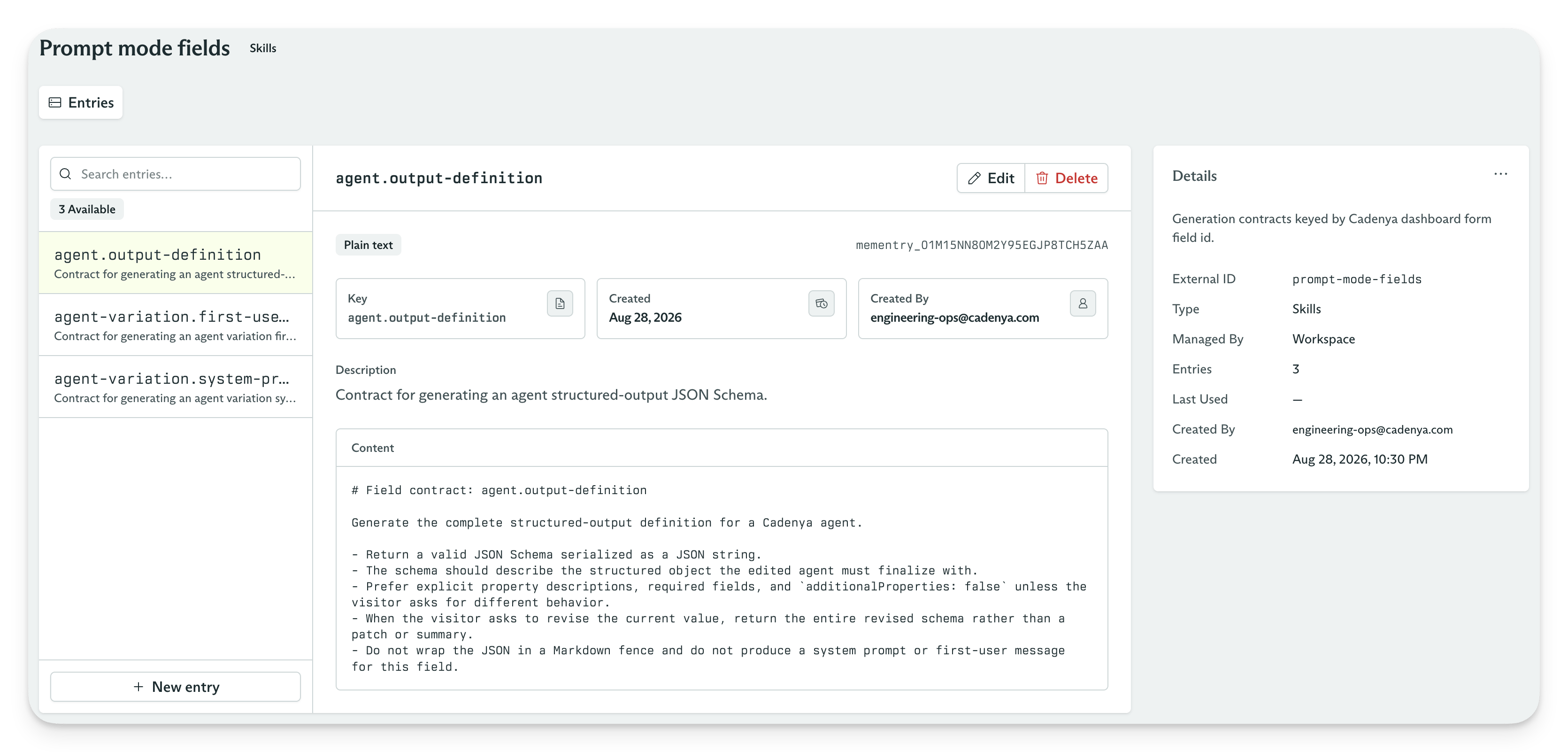
Below is an example of how Cadenya uses a Memory Layer + Entries to store the different prompt modes when using our `Prompt -> Config` generator in certain interfaces.
;
return caption ? {media} : {media};
};
Memory can be used in Cadenya to store skills and episodic entries.
## Layers
Memory layers are used as containers of several memory entries. That way a memory layer can be added to an agent variation quickly, and all of the entries within it become available to an agent when it is working through an objective.
The order of memory layers that are added to your Agent Variation's matters, too. If a layer contains the same "key" in it as another, the one that is highest positioned (position being zero indexed).
## Entries
An entry can be thought of like a blob, object, record, etc. It's a piece of data contained in your memory layer, that has a `key` that your agent's will use to retrieve the contents in your agentic loop.
Entries can be either stored using raw text, or by uploading a file.
Below is an example of how Cadenya uses a Memory Layer + Entries to store the different prompt modes when using our `Prompt -> Config` generator in certain interfaces.
 ## Assigning to an Agent Variation
Memory Layers can be directly assigned to Agent Variation, like a Tool Set is. Once assigned, Objective's that are dispatched for the variation will automatically include references to all of the entries within the layer in the system prompt for you.
The format of the memory entries in the system prompt will resemble:
```
key: styles/prose.md
description: This is where we store our prose. Should be read when writing customer-facing content.
```
Then you can assign your memory layer with entries to your agent variation like so...
## Assigning to an Agent Variation
Memory Layers can be directly assigned to Agent Variation, like a Tool Set is. Once assigned, Objective's that are dispatched for the variation will automatically include references to all of the entries within the layer in the system prompt for you.
The format of the memory entries in the system prompt will resemble:
```
key: styles/prose.md
description: This is where we store our prose. Should be read when writing customer-facing content.
```
Then you can assign your memory layer with entries to your agent variation like so...
### Observing Memory Usage in Objectives
Once your memory is assigned to an agent, you can see it read entries in your objective's event timeline, or the raw tool call logs, too.